
Off
No drafts and nothing sent automatically. Your team replies as before.
The AI Autopilot answers guest messages on Airbnb, Booking.com, Expedia and WhatsApp. You decide per property whether it only writes drafts or sends replies itself. When it is unsure, it does not answer but hands over to your team.
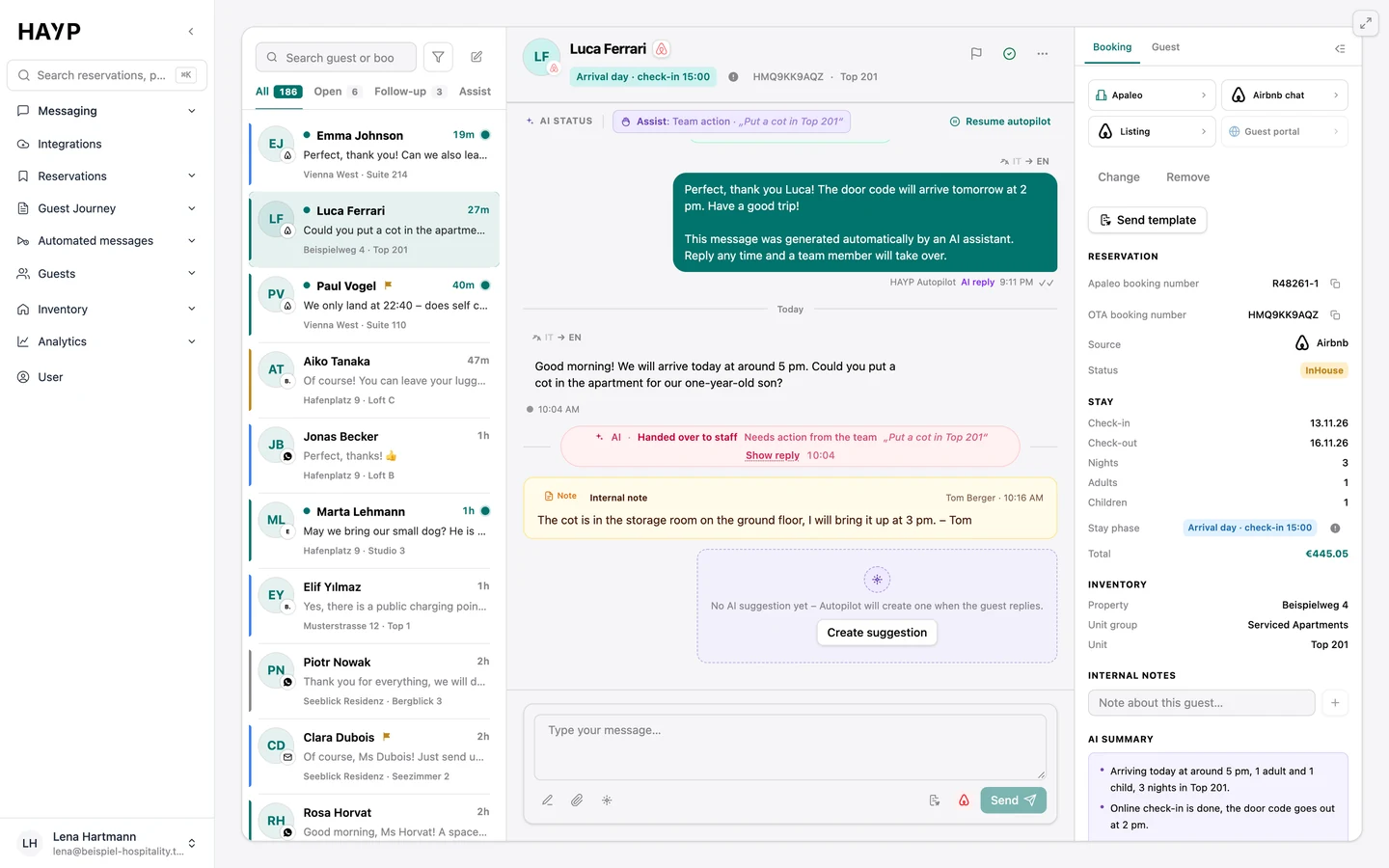
Teams looking for a hotel chatbot usually want one thing: recurring questions about check-in, parking or luggage should no longer be answered by hand. The Autopilot does that for operators with several properties, inside the guest inbox and in the guest's language.
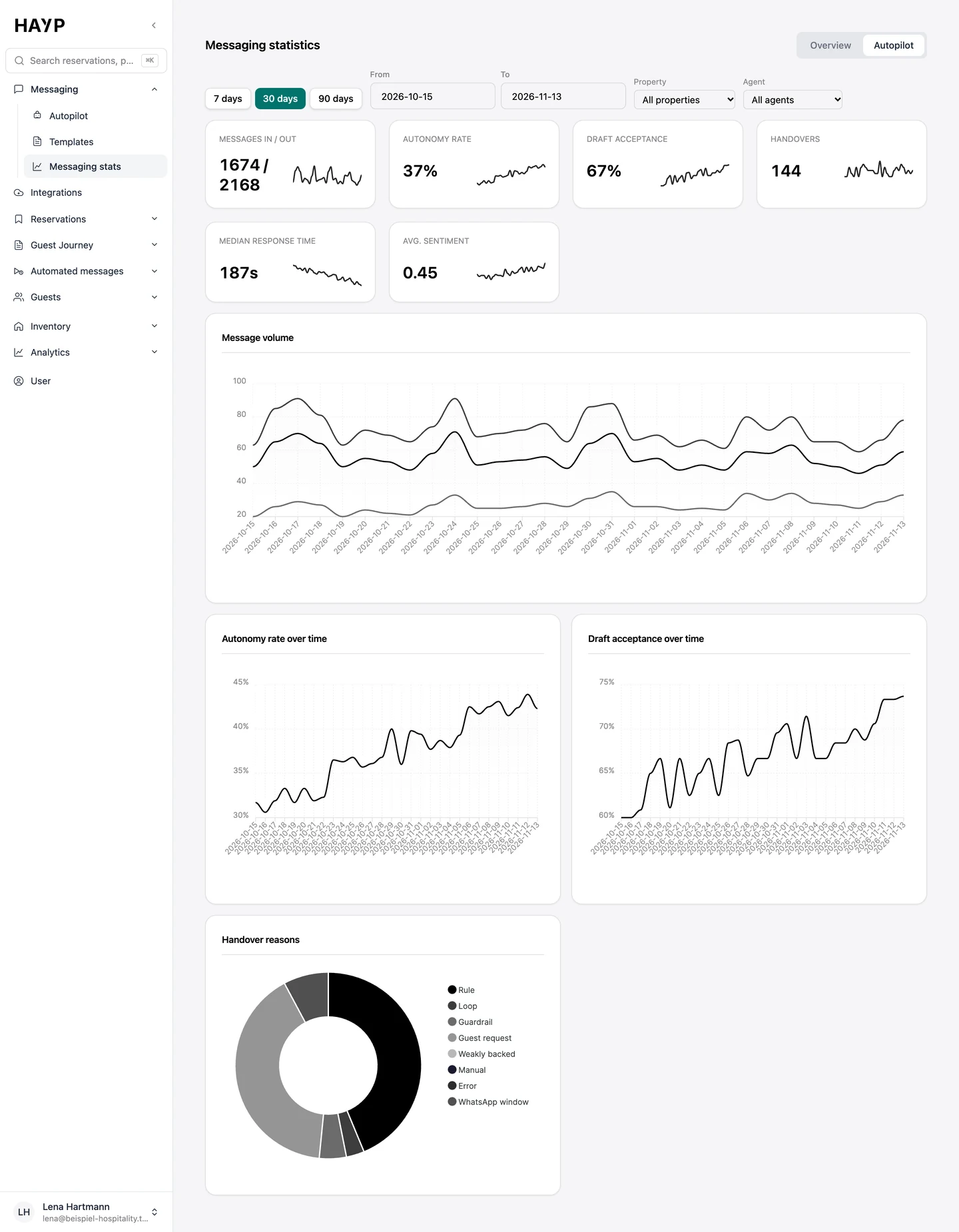
It works with agents: AI agents for hotels and apartments that you set up yourself. Each agent covers all properties or selected ones and has its own mode, instructions and limits. One property can start on drafts while another already answers autonomously. Last month this added up to more than 1,300 AI responses (as of November 2026).
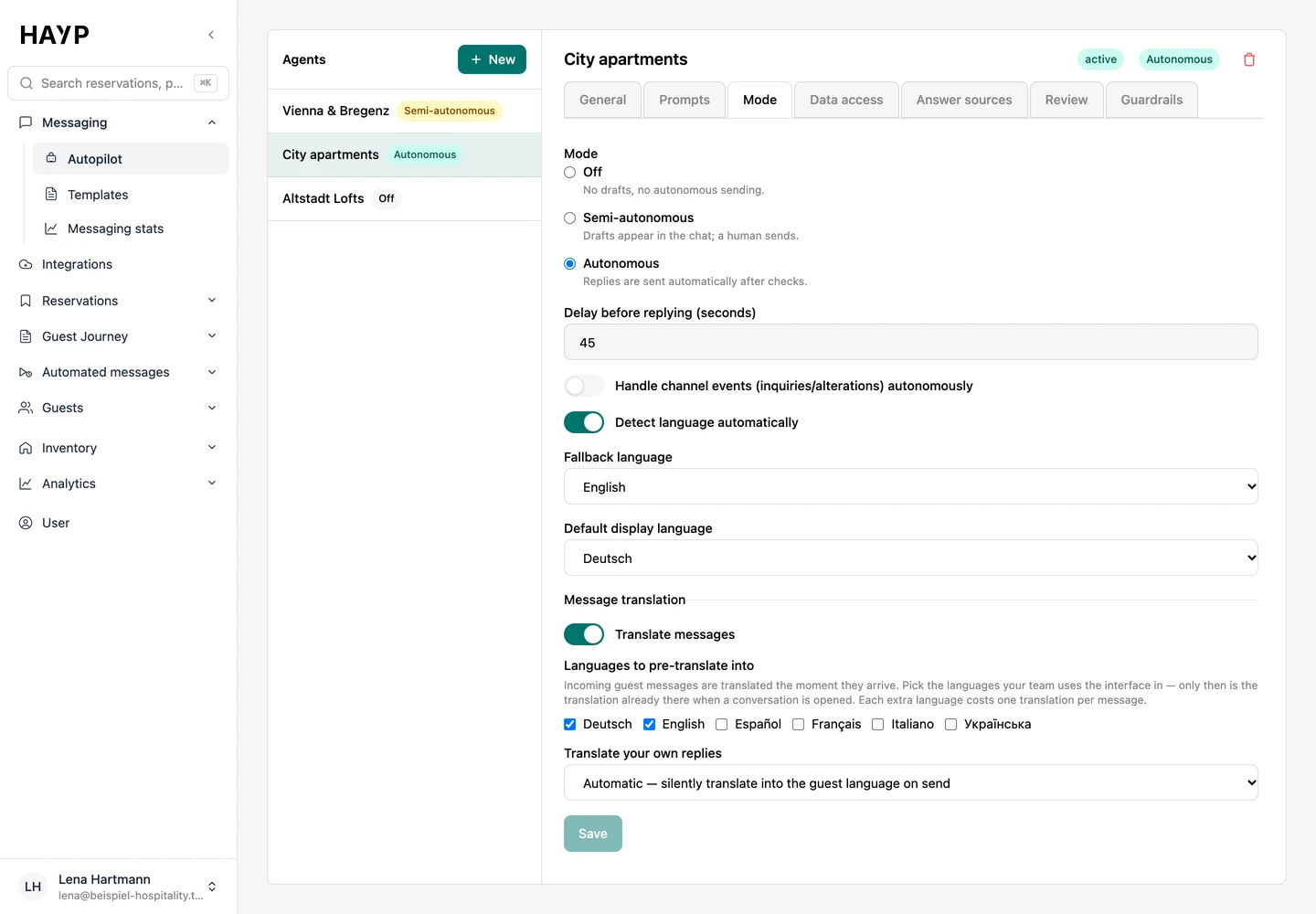
You set the mode in the “Mode” tab and can change it any time.
No drafts and nothing sent automatically. Your team replies as before.
The draft appears in the thread. A person sends it unchanged, edits it, has it made shorter or friendlier, or discards it.
Replies go out automatically after the checks and a delay you set. Reservation and alteration requests from the channel are answered only if you switch that on.
Off, semi-autonomous or autonomous, plus the wait before sending and the languages of the replies.
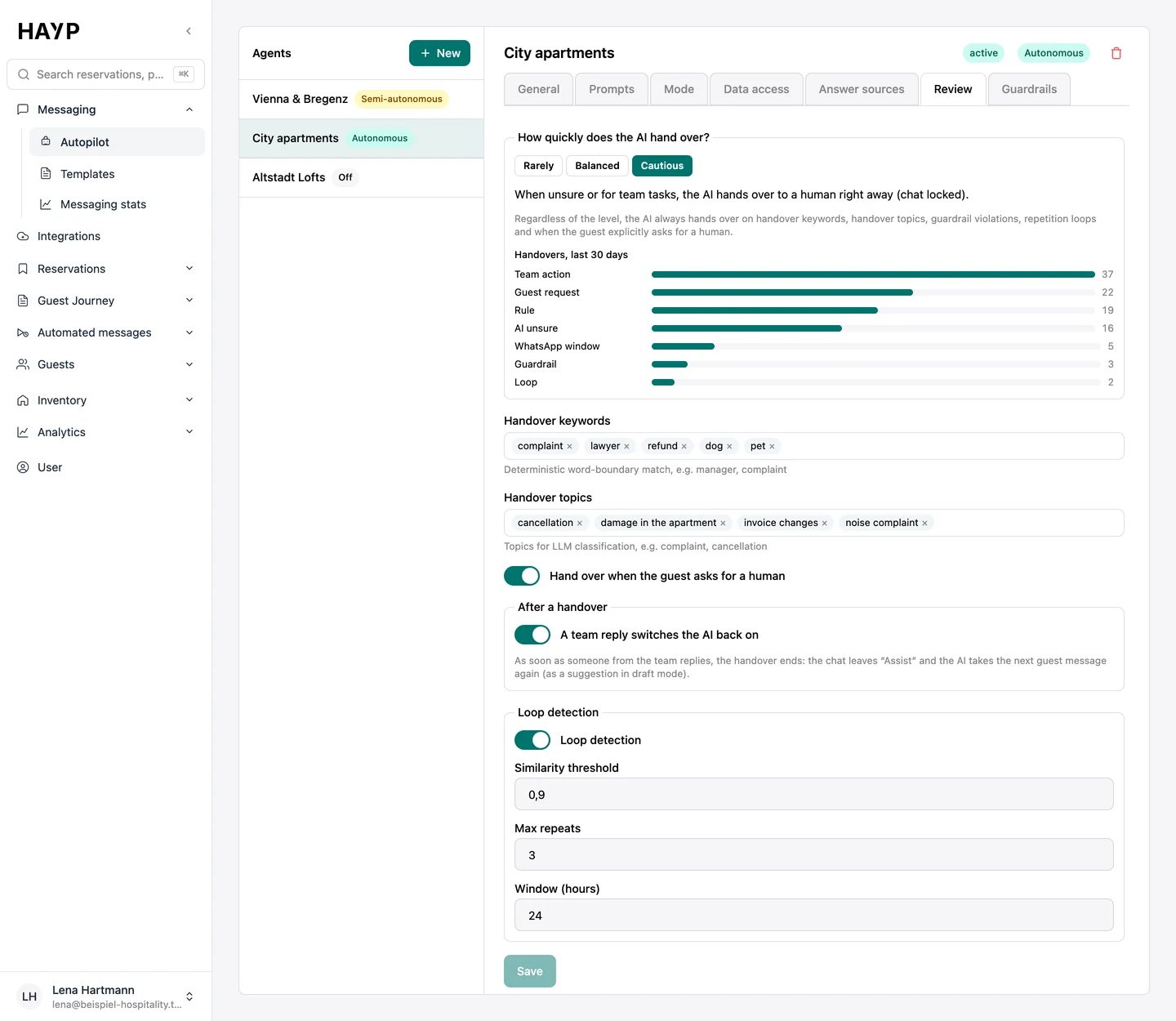
How quickly the AI hands over, plus keywords and topics where a person always takes over.
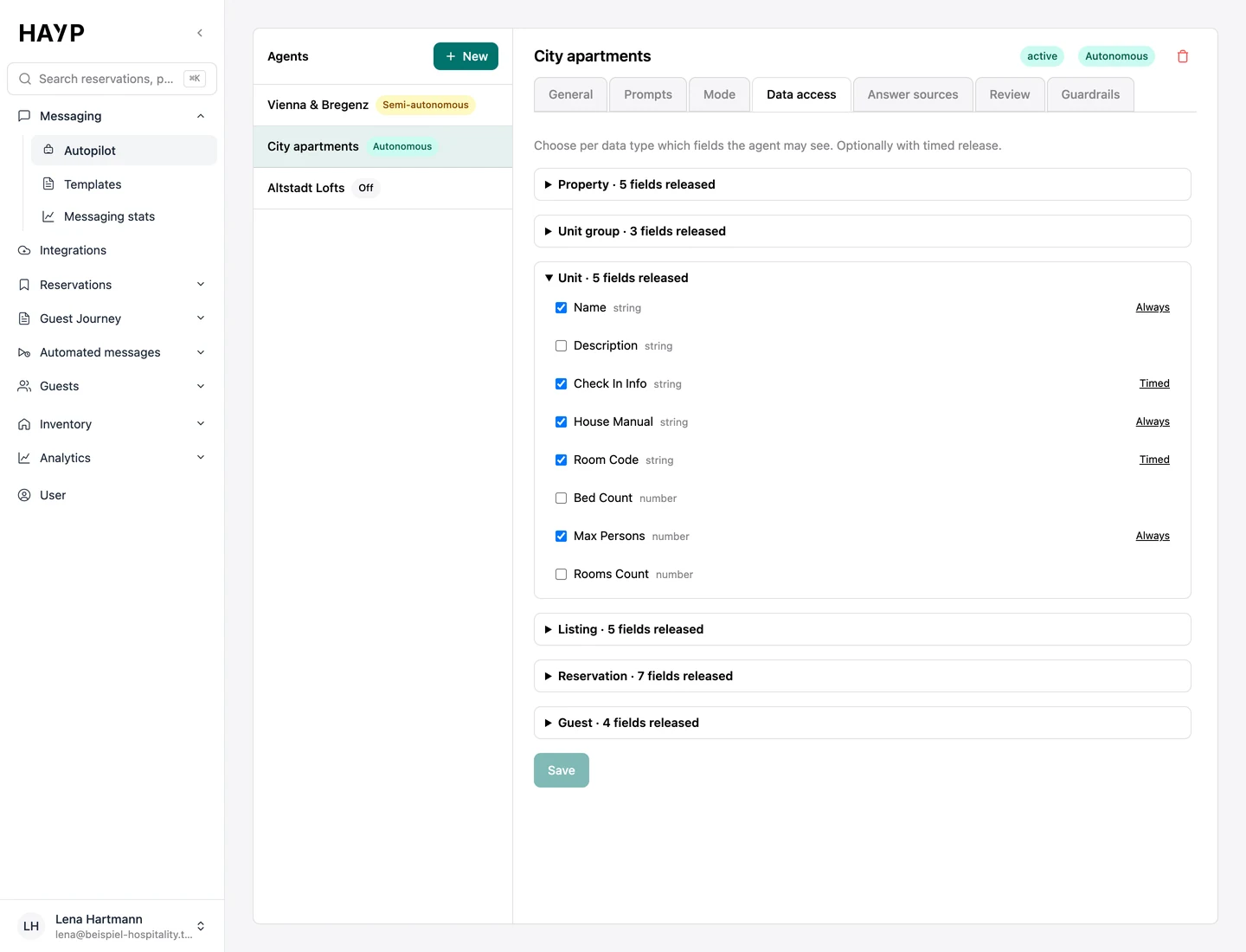
Which fields the AI may see, if you wish only from check-in, such as the door code.
How many conversations the AI answers on its own and how often your team accepts drafts.
A scripted chatbot for hotels follows fixed dialogue paths, which is predictable and sound for a defined set of standard questions. The Autopilot is built for questions whose answer depends on the booking.
| Aspect | Scripted chatbot | AI Autopilot |
|---|---|---|
| Answer | Stored text for a predefined question or button | Written freely from released data, FAQs and rules |
| Link to the booking | Only if it was connected for that purpose | Knows the reservation, unit and stay phase |
| Question outside the plan | Stored fallback text | No guessed answer; handover to the team with the reason |
| Strength | Fixed wording, every answer known in advance | Covers more questions, in the guest's language |
Handover keywords and topics such as complaint or cancellation apply at once and a person takes over. Guardrails, once switched on, also check the message for manipulation attempts and blocked topics.
In the “Data access” tab you decide which fields the agent may see for property, unit group, unit, listing, reservation and guest. Fields can be released on a timer, such as an access code only around check-in. FAQs and rules from Answer review are added.
Guardrails can check the finished reply as well. The grounding check holds back a reply that is not sufficiently backed by that knowledge; you set the threshold.
Depending on the mode, the reply goes to your team as a draft or straight to the guest. Otherwise the conversation lands in the “Assist” tab.
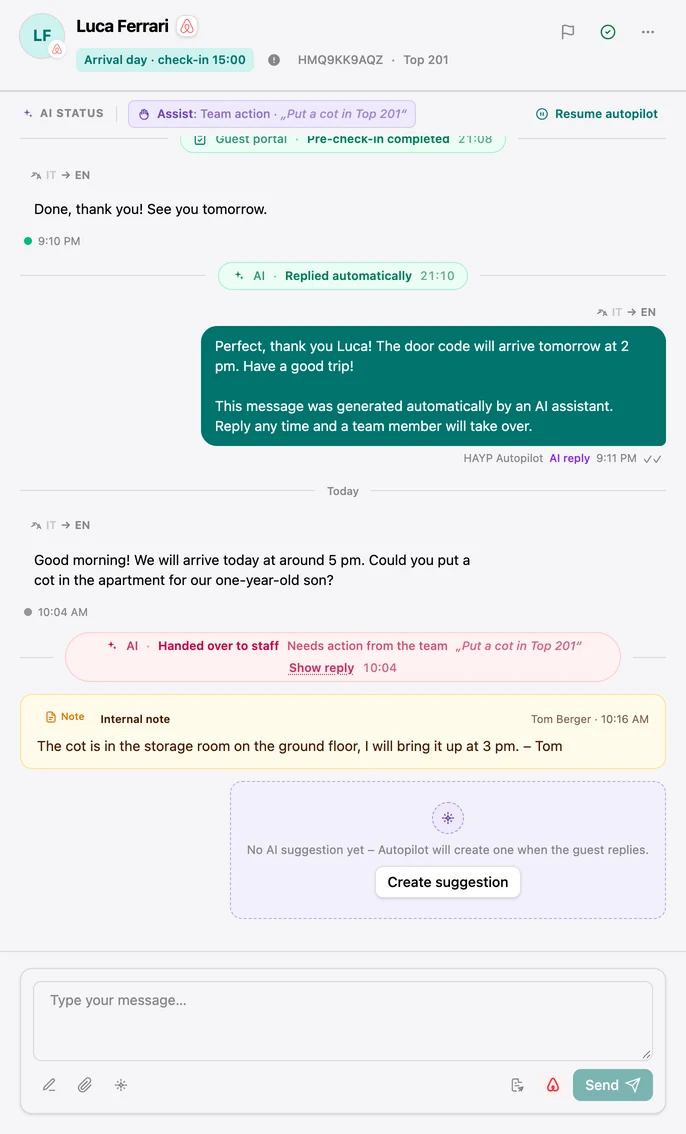
The Autopilot takes no actions: it does not book, change or cancel anything, and by default it promises nothing that only your team can decide. Such requests go to a person. It also hands over when
How early it hands over when unsure is set in three levels: Rarely, Balanced, Cautious. Your team sees the reason in the thread and resumes the Autopilot afterward. When the AI replies autonomously, the first reply in each conversation carries a notice that an AI assistant wrote it; in autonomous mode it cannot be switched off.
Every AI action is logged in the thread: suggestion created, sent unchanged, sent with edits, discarded, replied automatically, reply held back, handed over to staff. “Show context” shows which data went into a reply and which checks ran.
An agent that answers guest questions takes days to build. What makes it dependable lies outside the model: messages through the intended routes instead of an extranet login, answers only from approved knowledge, protection against manipulation, handover when unsure and a log. In the Autopilot these are settings, maintained by the HAYP team. More under build or buy.
Answer review groups how your team actually answered recurring guest questions: by topic, with counts and per property. AI replies and automated messages never count.
You see who answered how, an example chat, the weekly review progress and conflicts with existing FAQs. The Autopilot uses both from the next message on.
Automated guest messages from booking until after departure: a schedule per property, channels per message, send rules, delivery status and a full log.
Learn moreHAYP's hotel CRM builds one profile per guest from reservations, pre-check-ins and reviews, with duplicate checks, consent history and retention rules.
Learn moreAI for hotels: where it helps with guest messages, reviews and translation, where it does not, and what to check before an AI answers your guests.
Learn moreFAQ
All of HAYP's AI features run in the EU, and the platform itself in Frankfurt. No AI model is trained on your data or your guests' messages.
The AI is instructed to answer only from the knowledge you released and to hand over when unsure. Per agent you can also switch on guardrails for guest message and reply, plus a grounding check that holds back weakly backed replies. This cannot rule out every mistake, so cautious teams start in Semi-autonomous mode, where a person approves every reply.
It uses the fields you release in the “Data access” tab, from your PMS, listings, reservations and Guest CRM, plus the FAQs and rules from Answer review. For every draft you see the sources used and how well the reply is backed.
On every inbox channel. Airbnb, Booking.com and Expedia need a connection through Channex or the HAYP Channel Manager; WhatsApp is connected directly. Once Meta's 24-hour window on WhatsApp is closed, the Autopilot hands over to your team.
It is part of the AI guest inbox in the Guest Experience module: €6 per unit per month, net, with no minimum term. With our guide you set up the module yourself for free; if HAYP does the setup, it costs a one-time €100 per property. See the pricing page for all modules.
An agent that writes replies is quick to build. The hard part is the framework: knowing when not to answer, catching manipulation attempts, handing over to a person and logging every action. The Autopilot brings modes per agent, guardrails, a grounding check, handover rules and a log. More under build or buy.
Yes. AI features such as the autopilot, reply suggestions and translation cost nothing extra. To rule out surprise costs, each customer has a safety cap of €100 of AI costs per month. If that is not enough for your volume, we raise it for your account. All prices are on the pricing page.
In a demo we show the modes, the handover and Answer review. Then you decide how much the AI answers alone.