
The hotel CRM that recognizes guests across every property and booking channel
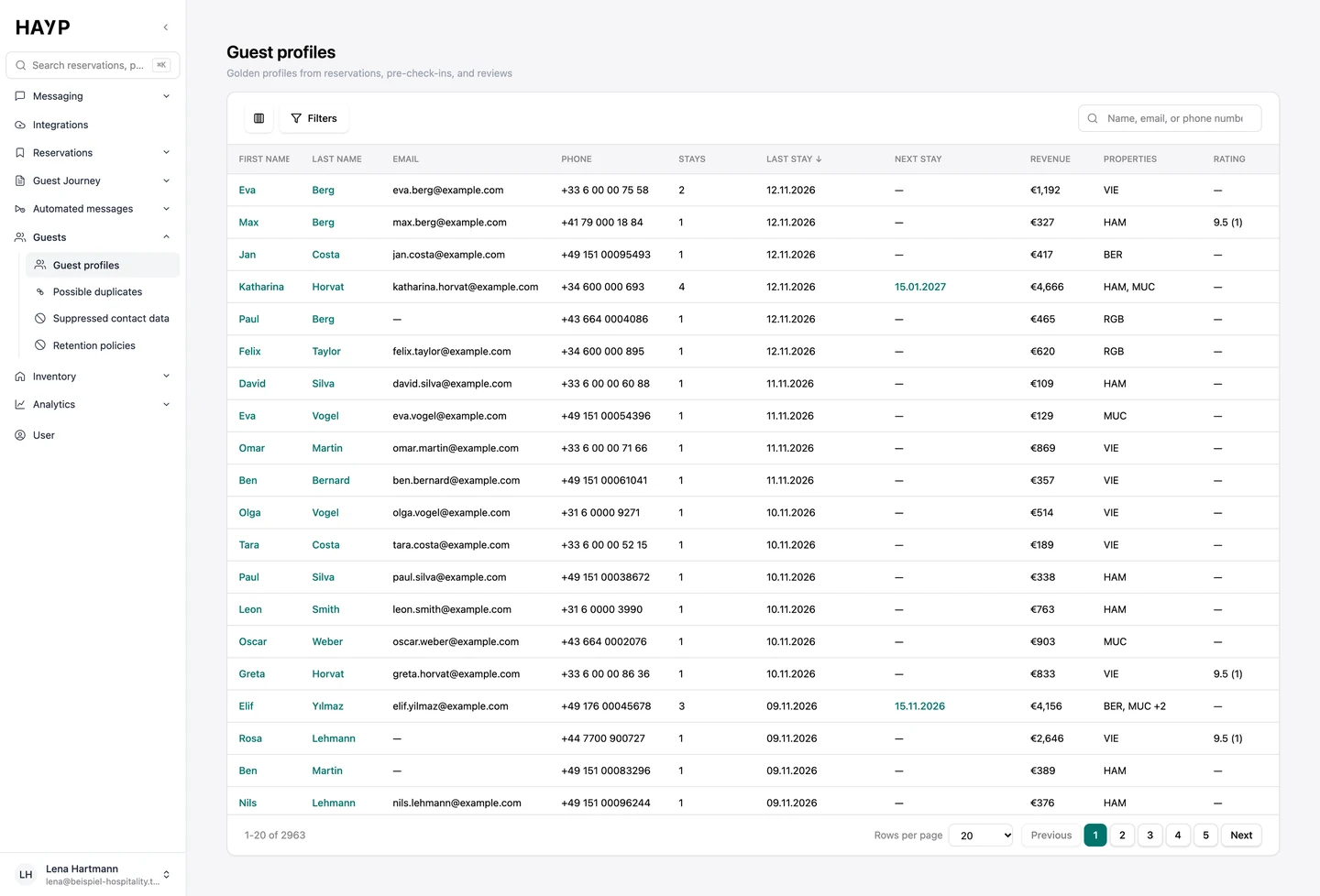
HAYP's Guest CRM is a hotel CRM for operators with several properties or many units who run Apaleo. It builds a profile for every guest automatically, from reservations, pre-check-ins and reviews. Your team sees at a glance how often a guest has stayed, what they booked and when they are due back.
What HAYP's hotel CRM does, and what stays in the PMS
HAYP is not a PMS. Reservations stay in Apaleo; HAYP reads them and matches them to people. When the same guest books once through Airbnb, once through Booking.com and once direct, the PMS holds their details on three separate reservations. In the Guest CRM that is one profile with every stay.
Search the Guest profiles list by name, email or phone number, or filter for returning guests, upcoming arrivals and guests with a review.
What a guest profile shows
Each tab answers a question your team would otherwise look up in the PMS, the inbox or a review site.
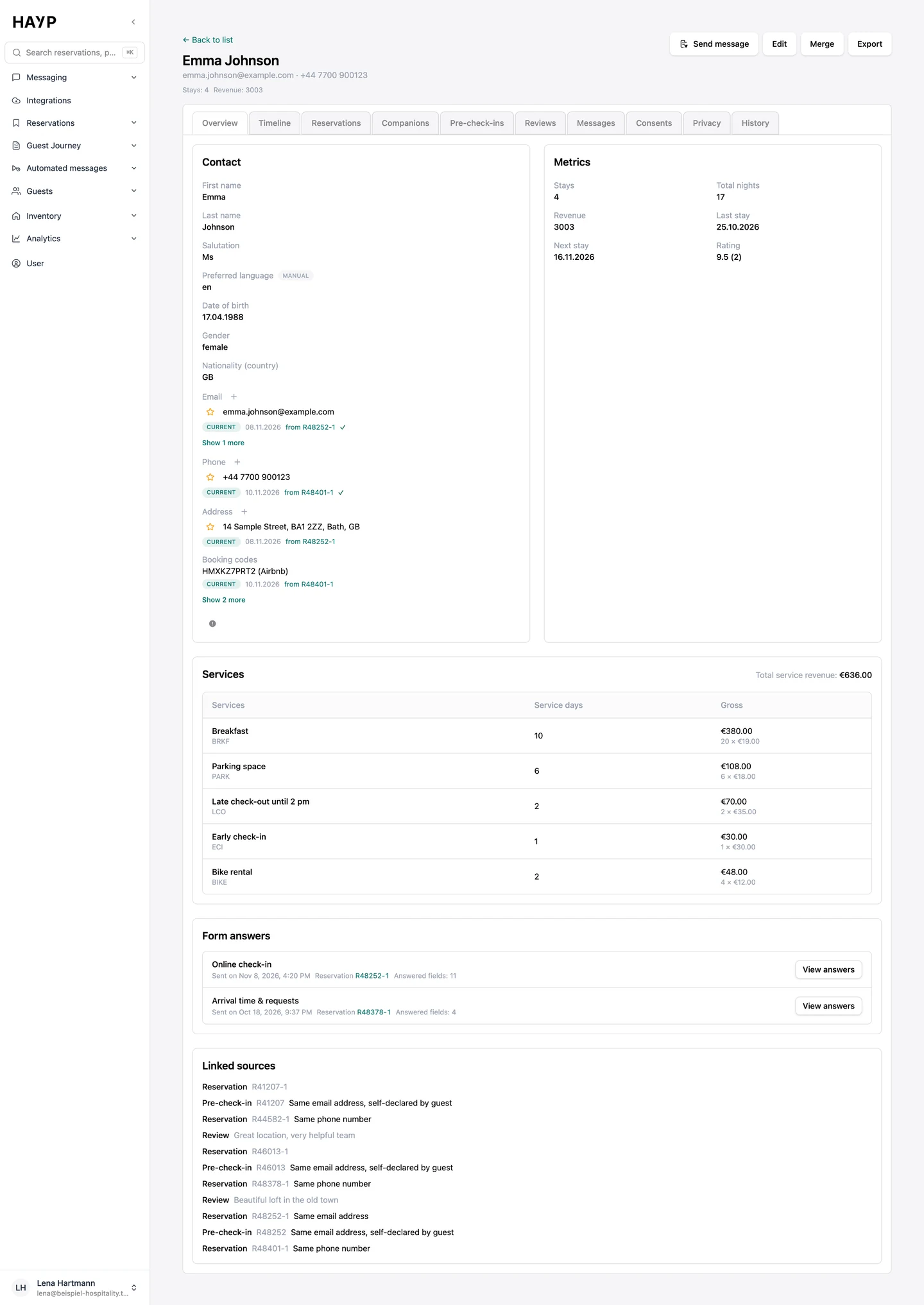
Overview
Contact details with language, date of birth and nationality, plus every known email address, phone number, address and booking code. Alongside: stays, total nights, revenue, last stay, next stay and rating.
Timeline
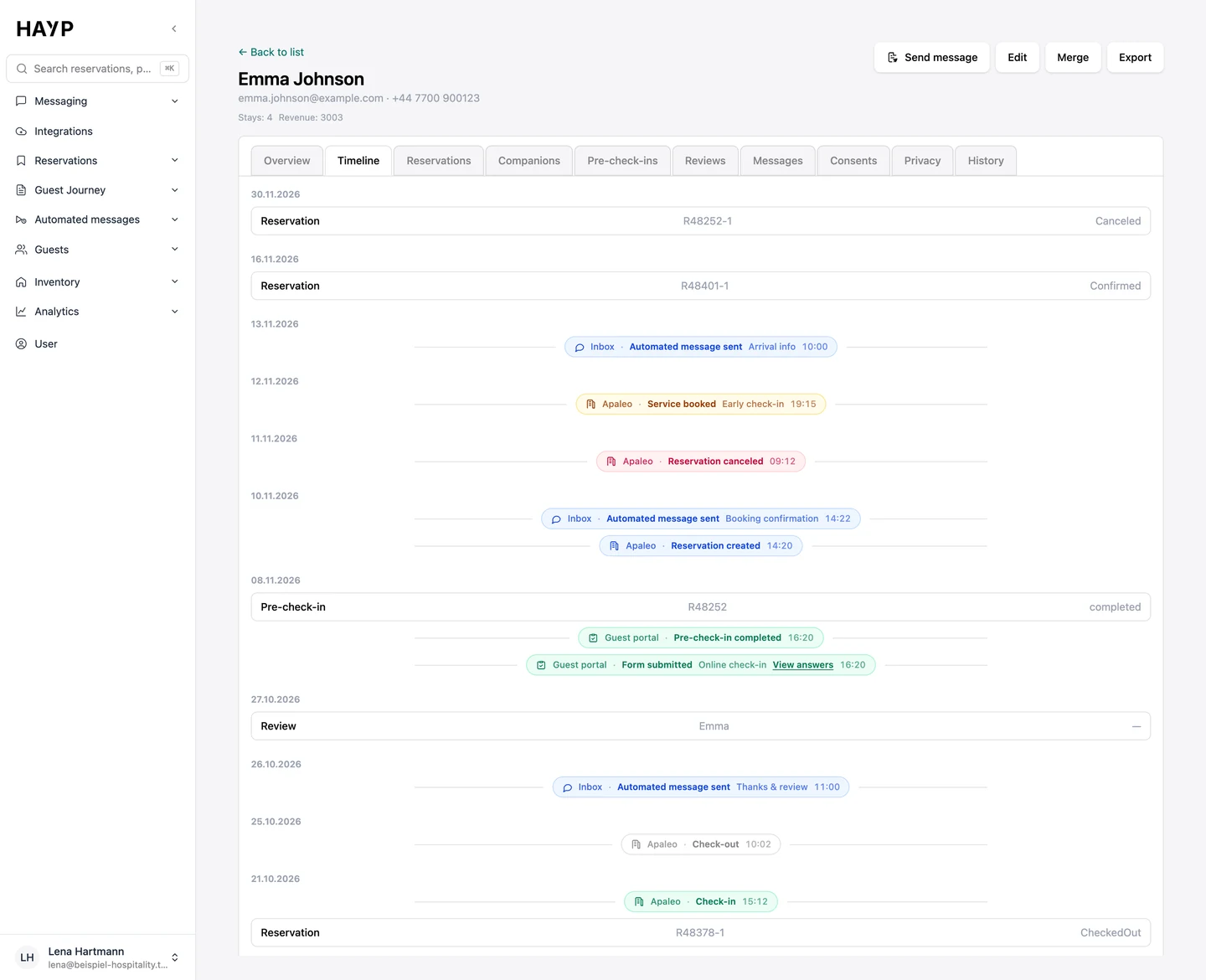
The guest's events by day: reservation created, room assigned, pre-check-in completed, special request, automated message sent, check-in and check-out.
Reservations and companions
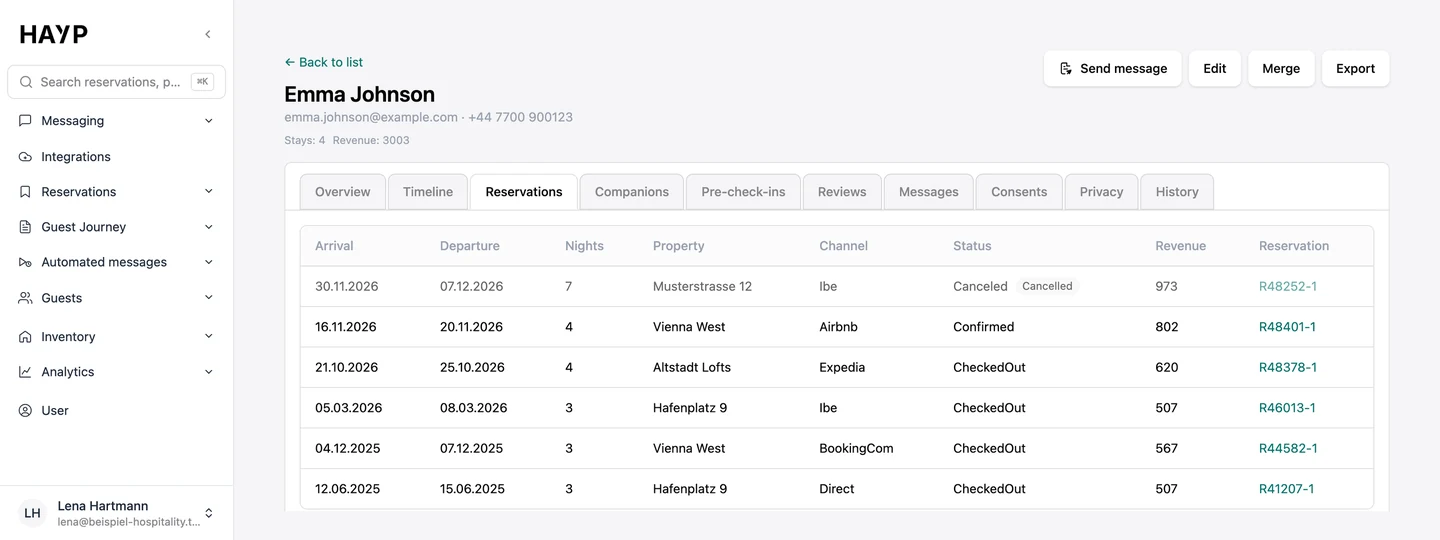
Every booking with arrival, departure, nights, property, channel, status and revenue. Companions lists the people who booked together with this guest.
Pre-check-ins and reviews
Pre-check-in details for each booking, and every review the guest has left, with date, platform and rating.
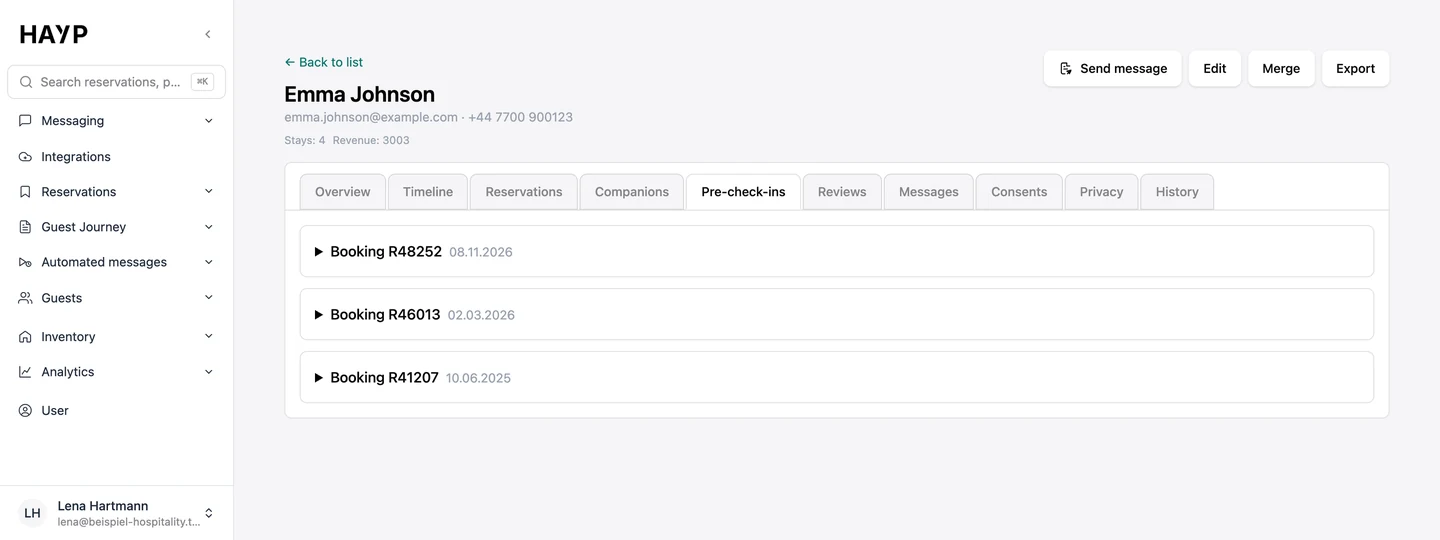
Messages
The guest's conversations with channel and status. One click opens the thread in the inbox.
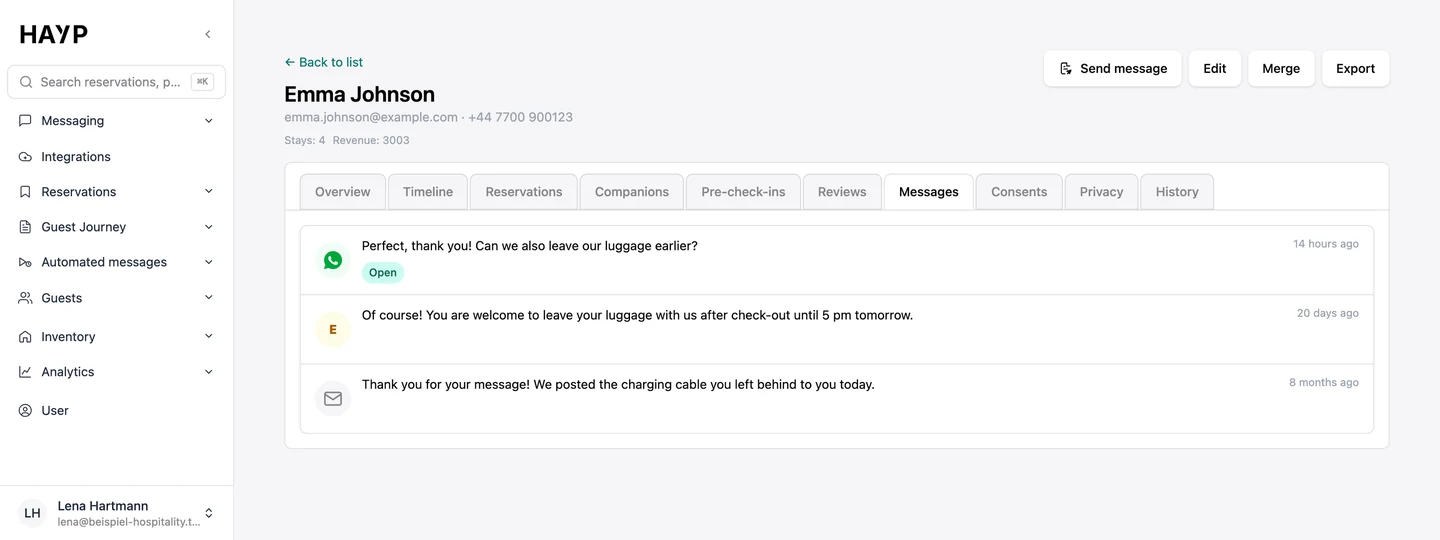
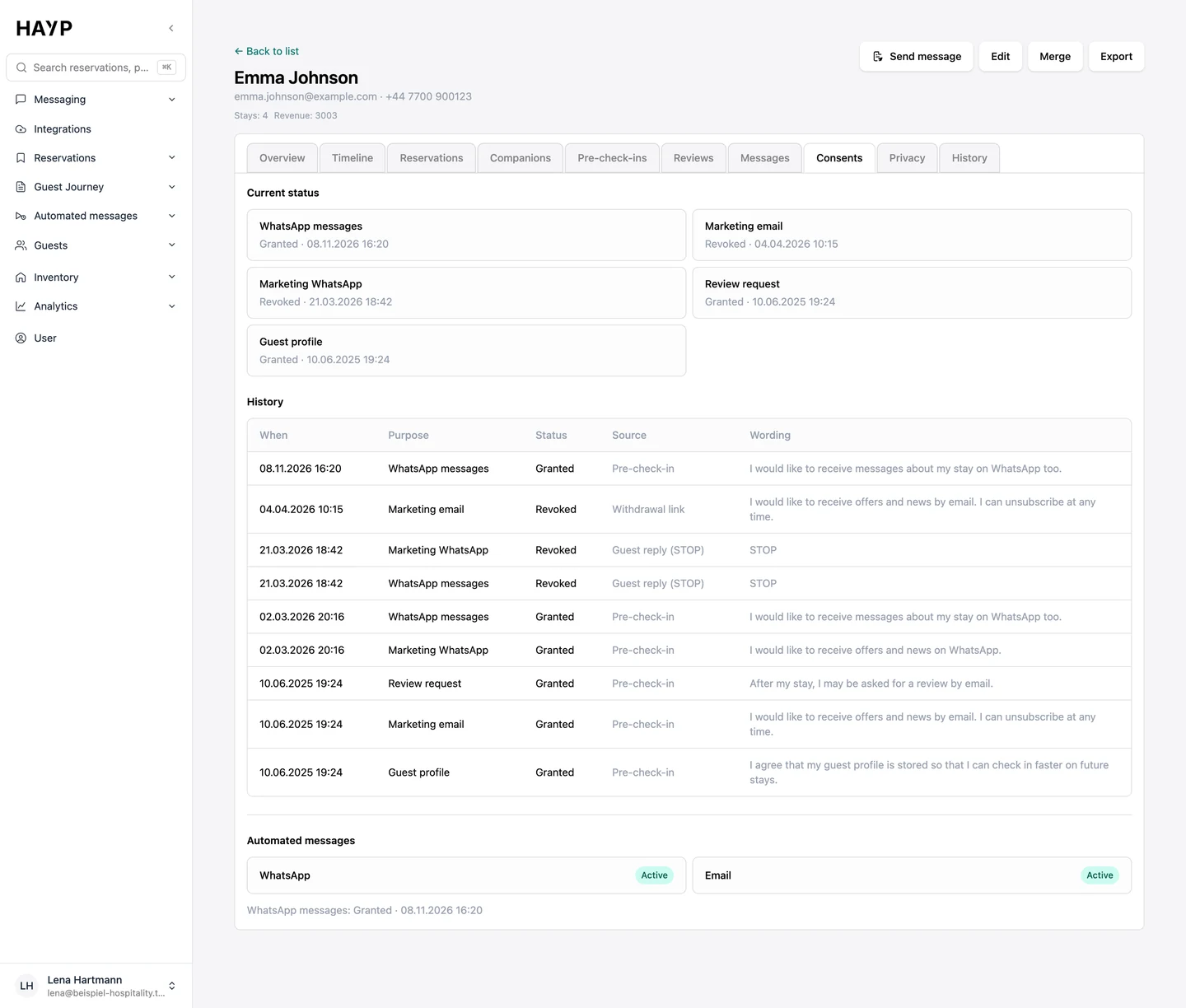
Consents and privacy
The current status for each purpose and the history with time, source and wording. The Privacy tab holds restrict, anonymize, delete and export.
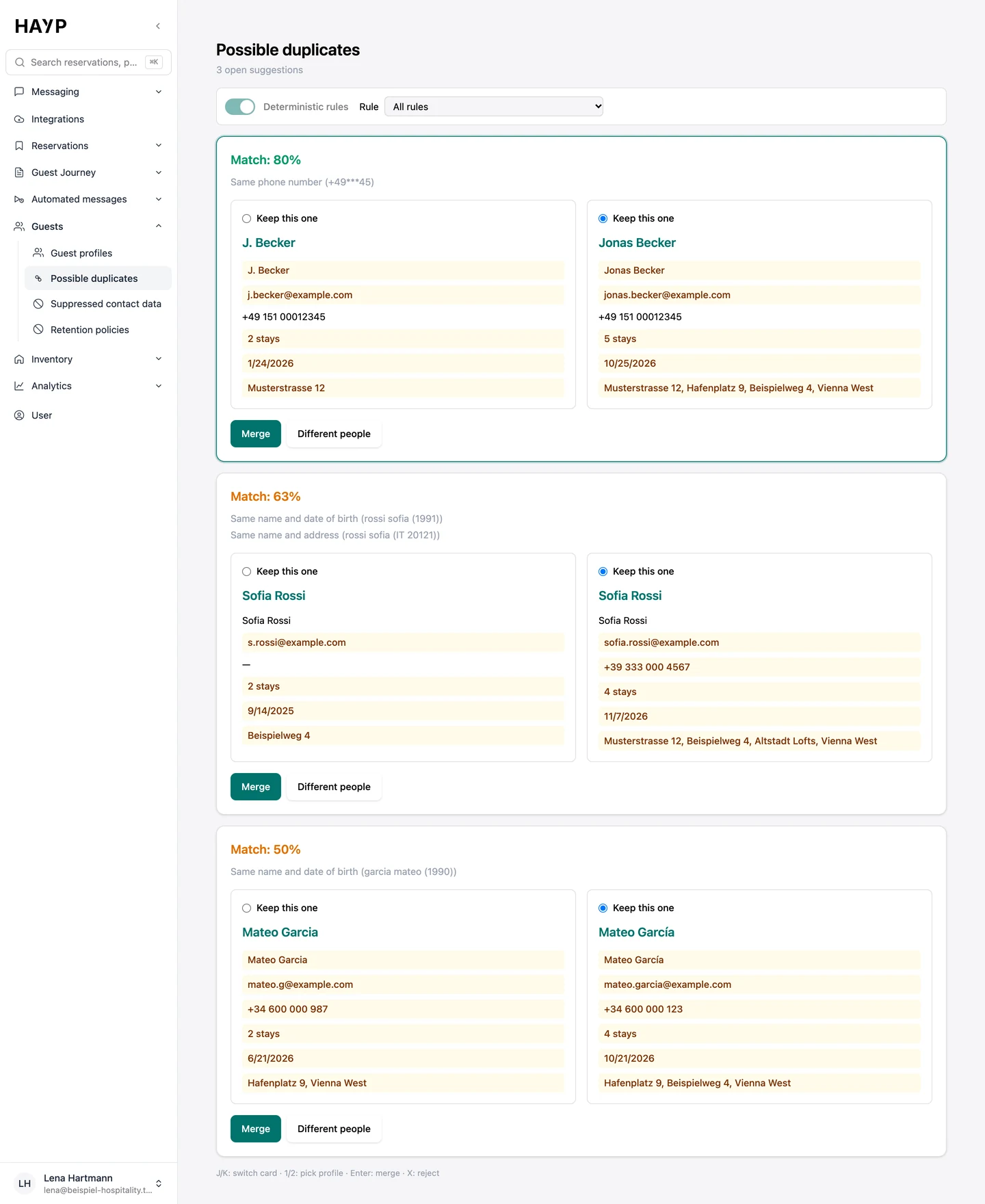
How bookings become one profile: finding and merging duplicates
Profiles are built without imports or manual work; your team only decides the uncertain cases.
HAYP links clear matches itself
Fixed rules attach new reservations, pre-check-ins and reviews to an existing profile: the same email address, phone number or document number, or the same name and date of birth.
You decide the uncertain ones
‘Possible duplicates’ shows two profiles side by side, with a match score and the reason. You merge them or mark them as different people. Both can be undone.
Shared and disposable addresses do not count
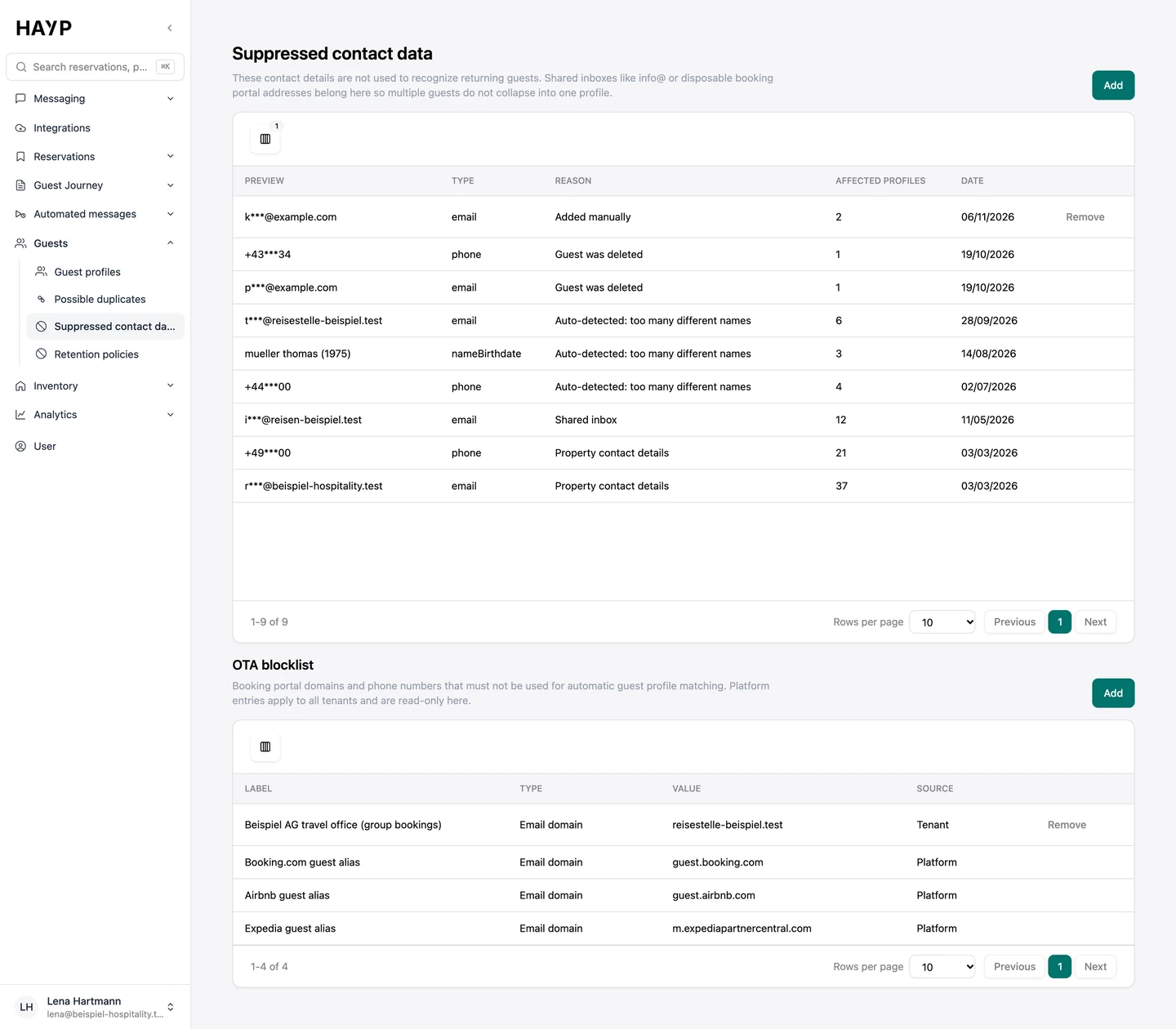
Shared inboxes such as info@ and the disposable addresses of booking portals sit under ‘Suppressed contact data’, so several guests never collapse into one profile.
Your corrections stay
Edit master data directly in the profile. Fields you change by hand are not overwritten by later imports.
The profile works alongside the inbox
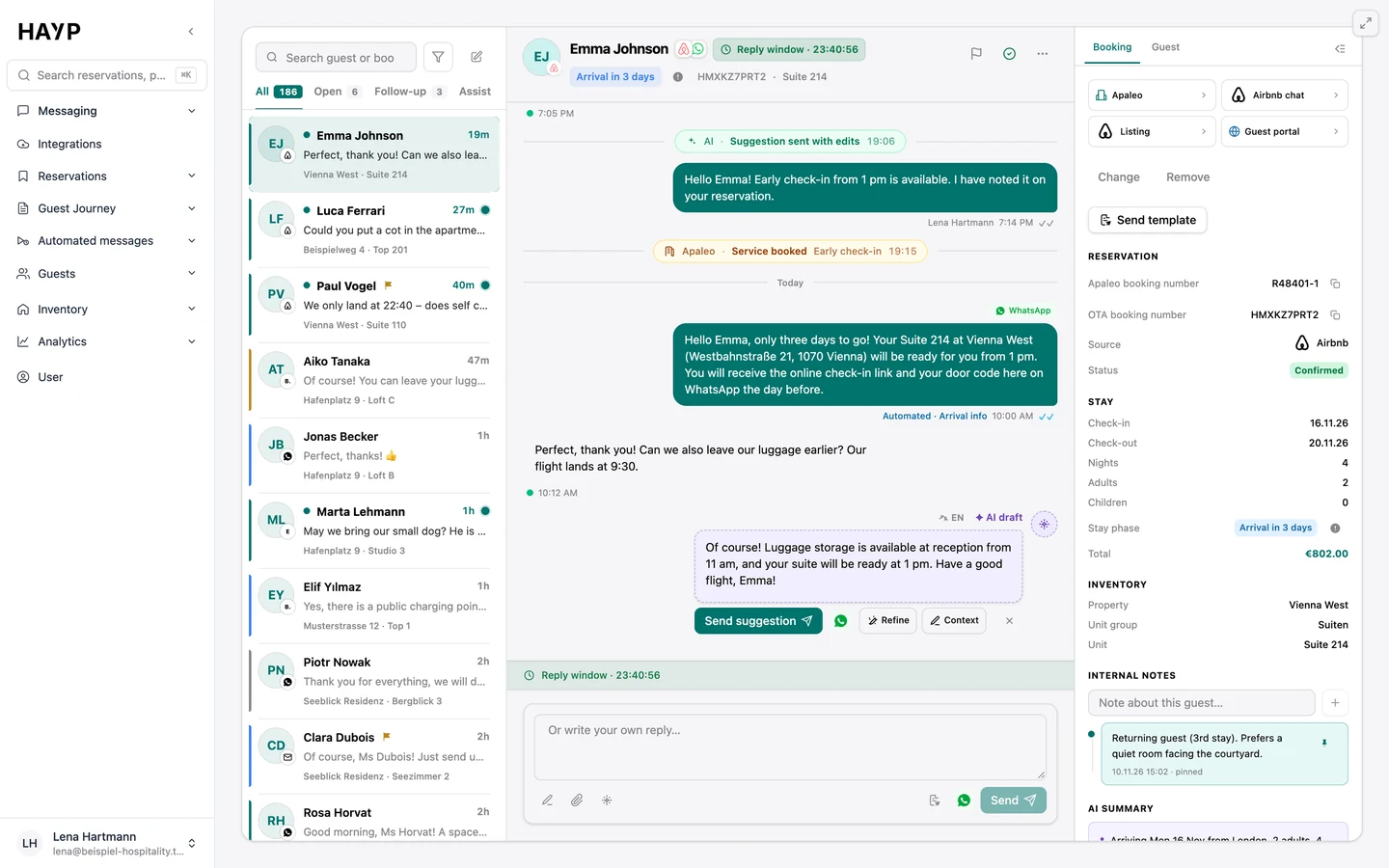
Beside every conversation, the inbox has a Guest tab with contact details, language and internal notes. Open in CRM takes you to the full profile.
Send message in the profile works the other way: pick a reservation, choose a template from your automated messages, check it and send. Without a reservation you can use WhatsApp and email. Airbnb and Booking.com need the channel connection, meaning Channex or the HAYP Channel Manager.
The AI Autopilot can use guest data as well. Under Data access you decide which fields it may see.
Retention, deletion and data requests
The Guest CRM comes with its own tools for handling personal data:
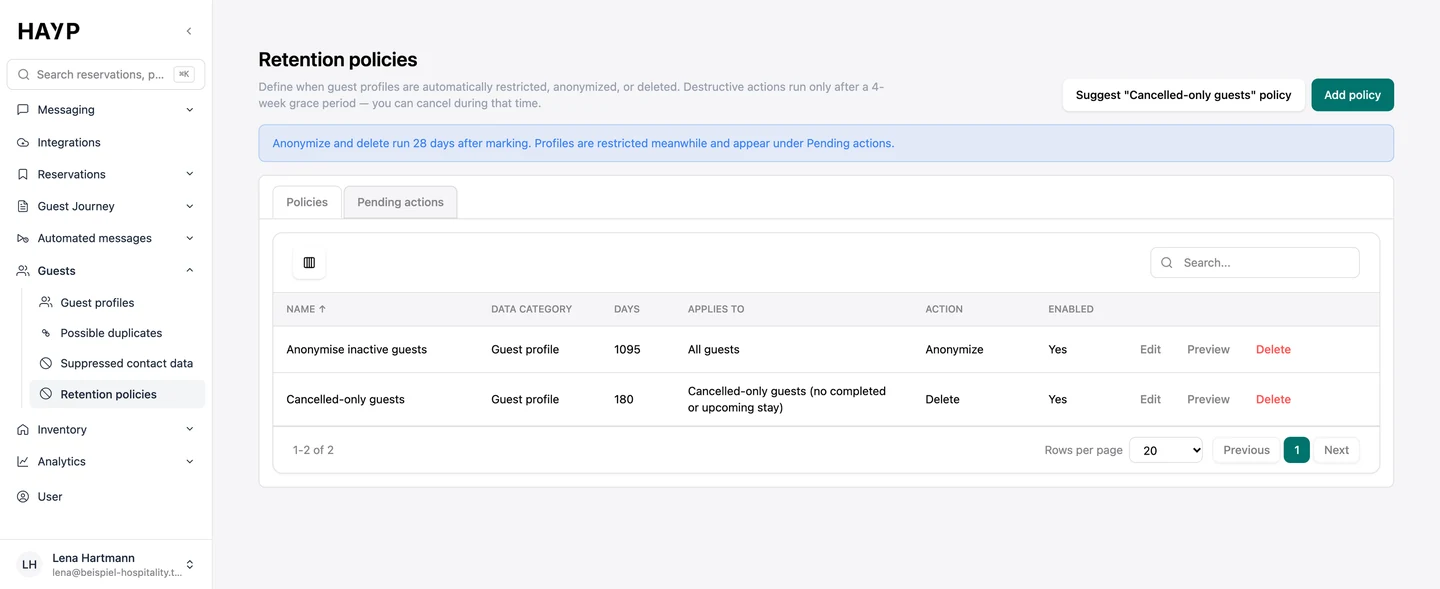
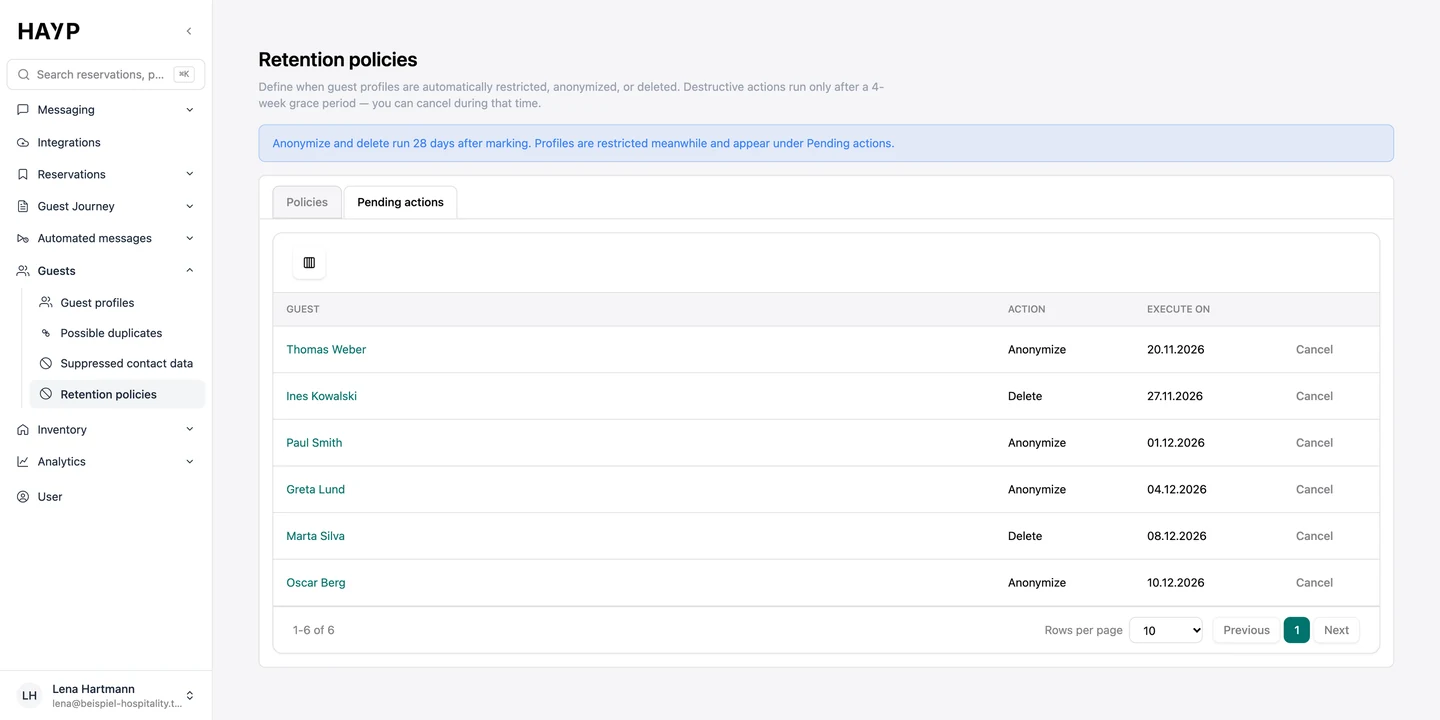
- Retention policies: set how many days after the last stay or the last cancellation guest profiles are restricted, anonymized or deleted, if you wish only for guests who canceled. A preview shows who is affected. Anonymizing and deleting run only after a 28-day grace period and can be canceled until then.
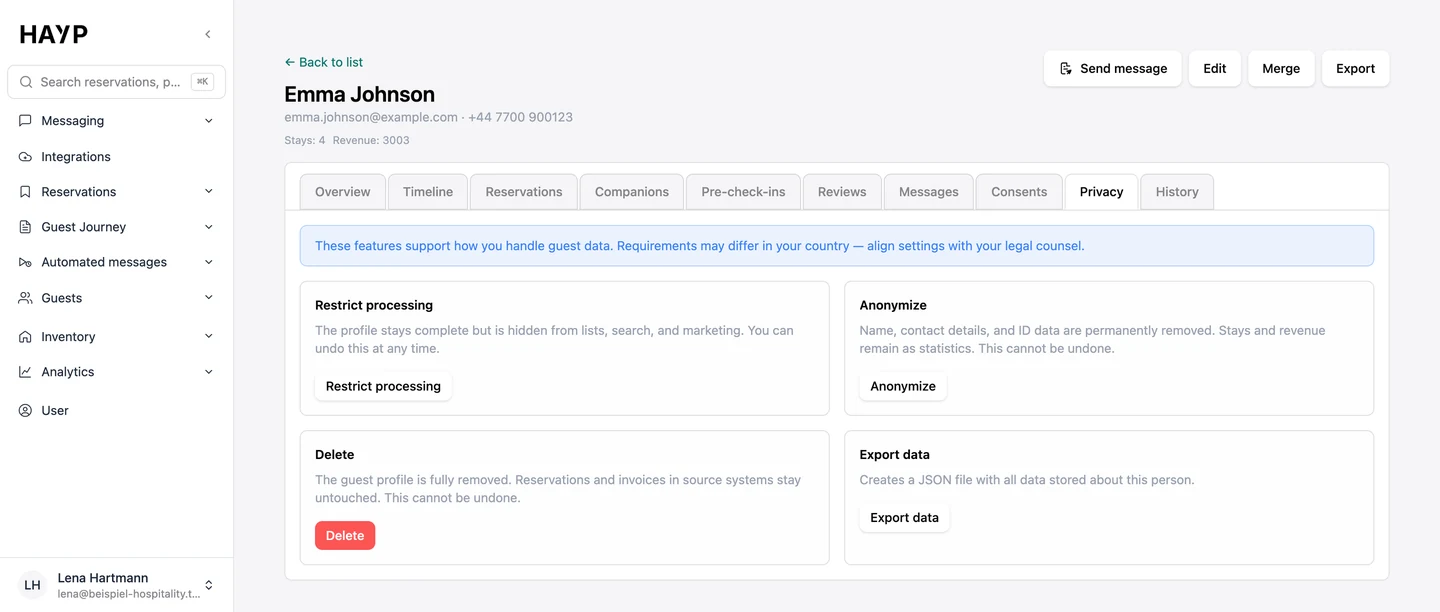
- Single profiles: restrict processing, anonymize or delete. Anonymizing keeps stays and revenue as statistics. Done by hand, anonymizing and deleting are final.
- Export: profile, reservations, pre-check-ins, reviews, consents and history as a JSON file, for example for a subject access request.
- History: every merge, restriction and consent is logged with time and person.
Which retention periods apply to your business is a question for your legal adviser.
Privacy
Restrict, anonymize, delete and export, each with its own permission.
Retention
Policies for guest profiles: a period from the last stay or cancellation, then restrict, anonymize or delete.
Pending actions
What happens next, with a date; every action can be canceled.
Excluded contacts
Shared and throwaway platform addresses and erased guests do not count when matching.
Related pages
Digital check-in
Digital check-in before arrival: guests enter guest and trip details on their phone, and the data is saved to the reservation and the guest profile.
Learn moreAI guest messaging
Guest messaging software for multi-property teams: Airbnb, Booking.com, Expedia and WhatsApp in one inbox, one thread per reservation, with context and AI.
Learn moreAI Autopilot
The HAYP Autopilot goes beyond a hotel chatbot: AI agents per property, three modes, guardrails and handover to your team, with a log in every thread.
Learn morePricing
HAYP pricing: Portfolio Operations €2, Guest Experience €6, Analytics €2 per unit per month, channel manager from €49. Net prices, with a calculator.
Learn moreFAQ
Frequently asked questions about the Guest CRM
What is a hotel CRM?
A hotel CRM is a guest database that brings a guest's data from every booking and point of contact together in one profile. In HAYP's Guest CRM that profile is built automatically from reservations, pre-check-ins and reviews.
Do hotels need a CRM if the PMS already holds guest data?
The PMS remains the source for reservations; HAYP does not replace it. The Guest CRM adds what is missing there: one guest recognized across bookings, channels and properties, with pre-check-in details, reviews, conversations and consents on the same profile. Apaleo is integrated directly, other PMS on request.
How does HAYP recognize the same guest across Airbnb, Booking.com and direct bookings?
With fixed rules: the same email address, phone number or document number, or the same name with date of birth or address. Disposable booking-portal addresses do not count. Uncertain matches go to ‘Possible duplicates’, where your team decides.
Where is guest data stored, and how do I delete it?
HAYP is hosted in Frankfurt, Germany. On the Privacy tab you can restrict, anonymize, delete or export a profile. Retention policies do this automatically after a period you set, with 28 days' grace before anything is anonymized or deleted.
Can I send newsletters from the Guest CRM?
No. The Guest CRM records the consents a guest has given, for example for marketing by email or WhatsApp, but sends no campaigns. From the profile you send single messages from a template. Scheduled messages around the stay are set up under automated messages.
How much does the Guest CRM cost?
The Guest CRM is part of the Guest Experience module at €6 net per unit per month. That also includes the AI guest inbox, digital pre-check-in, the guest portal and automated messages. There is no minimum term, and with our guide you set up the module yourself for free; if HAYP does the setup, it costs a one-time €100 per property. See pricing.
Why not keep guest profiles in our own database or spreadsheet?
A spreadsheet is quick to set up. The hard parts are duplicates across channels, the portals' throwaway addresses, consents, access requests and retention periods, which someone has to look after for good. The Guest CRM brings duplicate-detection rules, retention policies, anonymization, a privacy export and a history per profile. What a home-built version would also need is under build or buy.
See the Guest CRM in a demo
We show how guest profiles are built from Apaleo reservations and how your team uses them in the inbox.