
Overview
Total reviews, average and median rating, share of top-rated reviews and reply rate, plus the rating over time by platform and the rating distribution.
HAYP collects the reviews for all your properties from Airbnb, Booking.com, Expedia and Google in one list. Your team replies with an AI suggestion in the tone you choose, and the analysis shows what guests praise and what keeps going wrong. It is built for operators who no longer want to open every platform and every property one by one.
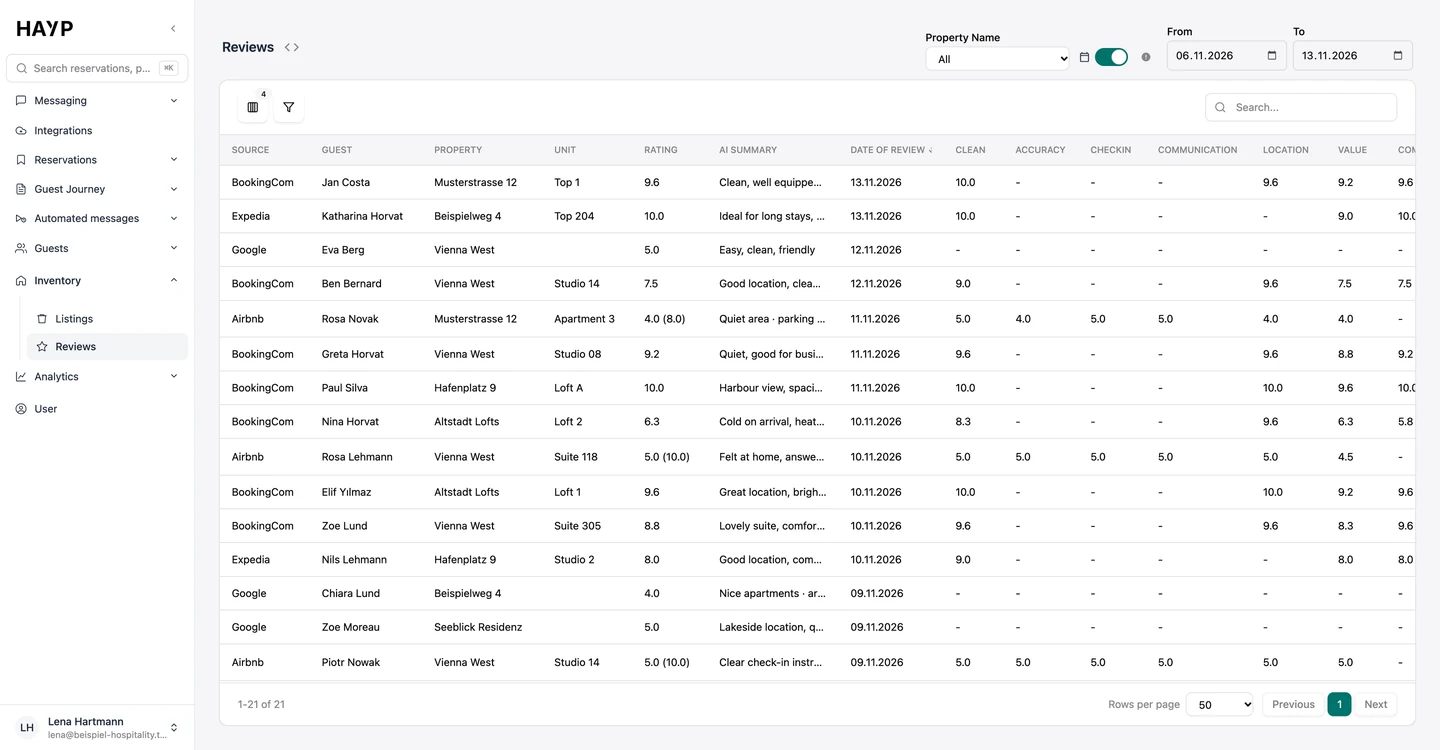
The Reviews list shows each review with source, guest, property, unit, arrival and departure, overall rating and an AI summary. Where the platform provides them, sub-scores are included, for example for cleanliness, check-in, communication, location and value. You filter by property, period and source. When a review is matched to a reservation, you see not only that someone complained about noise, but in which unit.
Reviews reach HAYP in two ways:
The AI review response is always a draft. Nothing is published until someone on your team sends it.
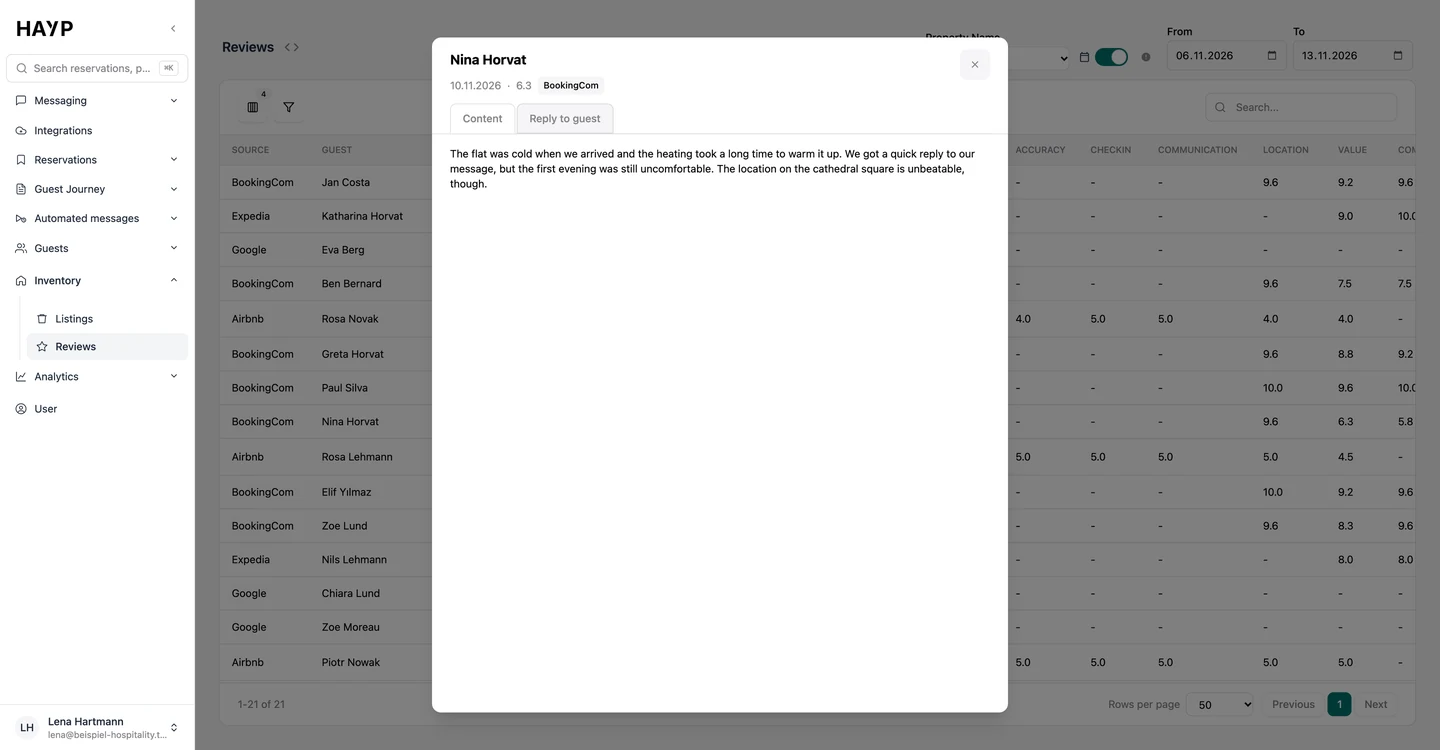
Click a row to open the dialog with text, date, rating and platform. A reply that already exists is shown right below.
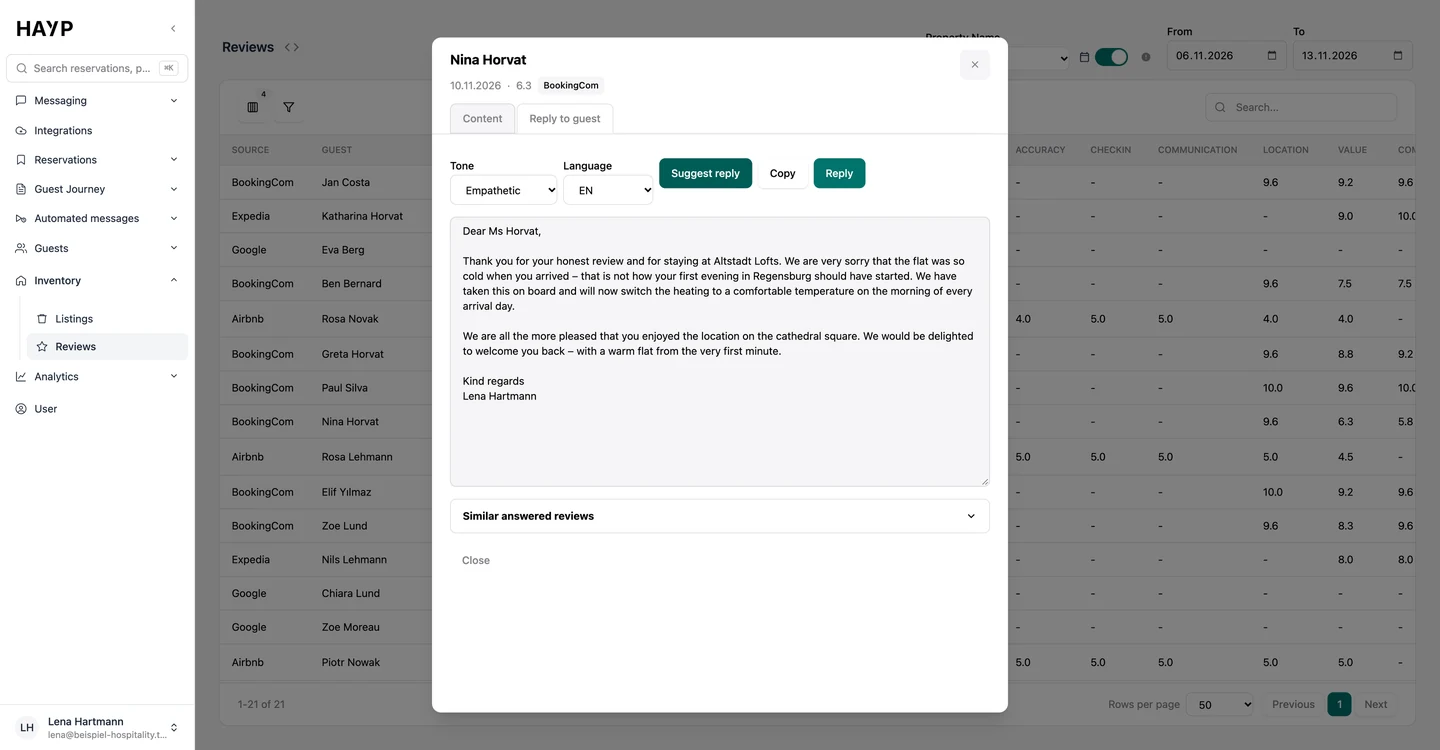
Friendly, formal or empathetic, in German, English, French, Italian or Spanish. ‘Suggest reply’ creates the draft.
Edit the text freely. Below it HAYP shows similar reviews that have already been answered.
‘Reply’ publishes the text through the channel connection. ‘Copy’ lets you take it to the platform, for example Google.
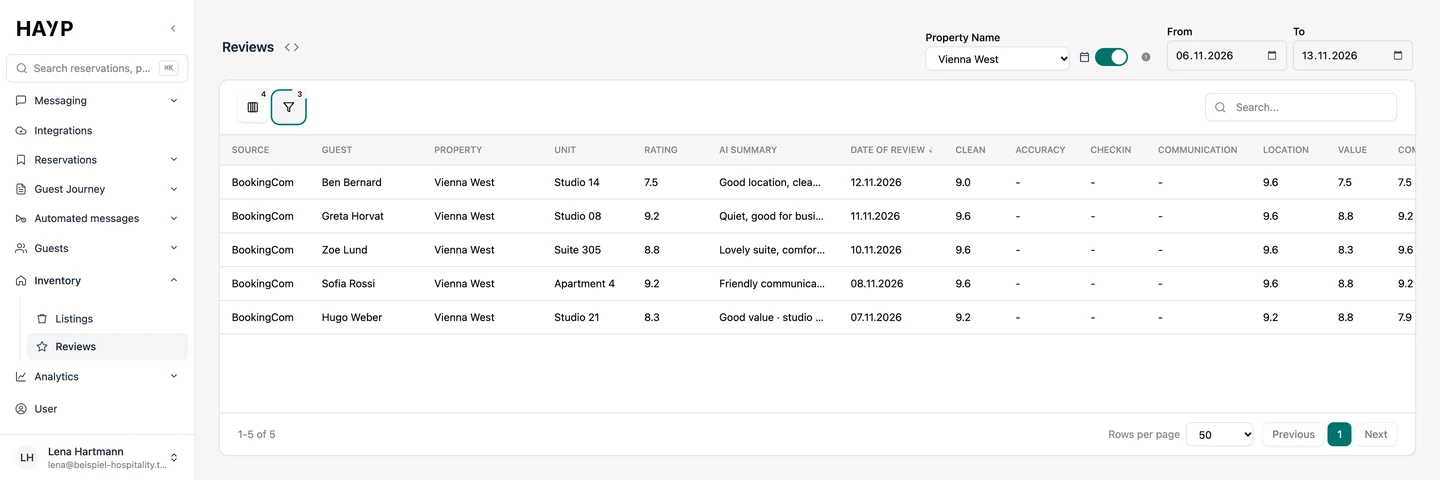
Filter by property, platform and period, for example only Booking.com reviews for Vienna West.
The dialog shows text, rating, platform and the reservation the review belongs to.
The AI writes in the chosen tone and takes its cue from up to five reviews you have already answered.
In Reviews analytics the AI reads every review that has text and assigns it to topics. The AI Insights tab has two views:
Click a topic to open the reviews behind it, translated if you wish. The insights can be exported as an Excel file. Reviews without text count toward the ratings but not the topics. How your properties compare is shown in portfolio analysis.
For hotel reputation management across a portfolio, Reviews analytics starts with the figures for the selected period and then moves into comparison.
Total reviews, average and median rating, share of top-rated reviews and reply rate, plus the rating over time by platform and the rating distribution.
Within one property you compare unit groups and individual units: count, average, median, spread and reply rate.
Portfolio analysis puts all properties side by side: an overview with comparison period, a ranking against the portfolio average, category scores and review mix.
Ratings on a scale of 1 to 10 or 1 to 5, filtered by source, reply status, property, unit group and unit.
For Airbnb reviews that arrive through the channel connection, the dialog has a Rate guest tab: public and private feedback, scores for house rules, communication and cleanliness, and whether you would recommend the guest. Airbnb gives both sides 14 days after checkout to do this. The ‘Guest reviewed’ figure shows how often your team manages it.
The widget shows selected reviews on your website with stars, text and platform logo, for all properties or a single one. You copy the ready-made code from HAYP into your page. Visitors can switch between German and English.
Hotel analytics for portfolios: room revenue, RevPAR, ADR, occupancy and cancellation rate per property, with comparison period, ranking and revenue mix.
Learn moreResponding to hotel reviews: structure, reply templates for positive, mixed and negative reviews, and what Google, Booking.com and Airbnb allow.
Learn moreThe HAYP Channel Manager is a hotel channel manager powered by Channex: rates and availability in sync, Airbnb and Booking.com messages in one inbox.
Learn moreHAYP pricing: Portfolio Operations €2, Guest Experience €6, Analytics €2 per unit per month, channel manager from €49. Net prices, with a calculator.
Learn moreFAQ
Open the review in HAYP, choose tone and language and ask for a suggested reply. Edit the draft, then send it through the channel connection or copy it to the platform. What makes a good reply is covered in the guide to responding to hotel reviews.
HAYP fetches Google reviews, analyses them and writes the draft reply. The reply itself is published in your Google Business Profile. Google requires a verified business for this and shows the reply publicly under the name of the business.
No. The AI writes a suggestion that someone on your team checks, edits and sends. You choose tone and language for every reply.
The AI assigns every review that has text to fixed categories and sub-topics and counts positive and negative mentions. That produces the ranked lists of praise and pain points. For every topic you can open the reviews behind it.
Airbnb, Booking.com, Expedia and Google. Through the channel connection reviews arrive continuously and can be answered from HAYP. Without a channel manager HAYP fetches them directly, and you publish the reply on the platform.
The review list with replies is part of the Portfolio Operations module at €2 net per unit per month; review analytics is part of the Analytics module at €2. Neither module needs any setup, and there is no minimum term. See pricing for details.
For one property you can do it by hand. Across several properties you would have to pull together reviews from Airbnb, Booking.com, Expedia and Google, match them to reservations, write replies in the right tone and analyze topics across the portfolio. HAYP collects reviews through the channel connection or directly, suggests replies in the tone and language you choose and shows what guests praise and what bothers them. More on the trade-off under build or buy.
We show the review list, the reply suggestion and the AI Insights, and work out how your reviews will reach HAYP.