
“Open reservations” list
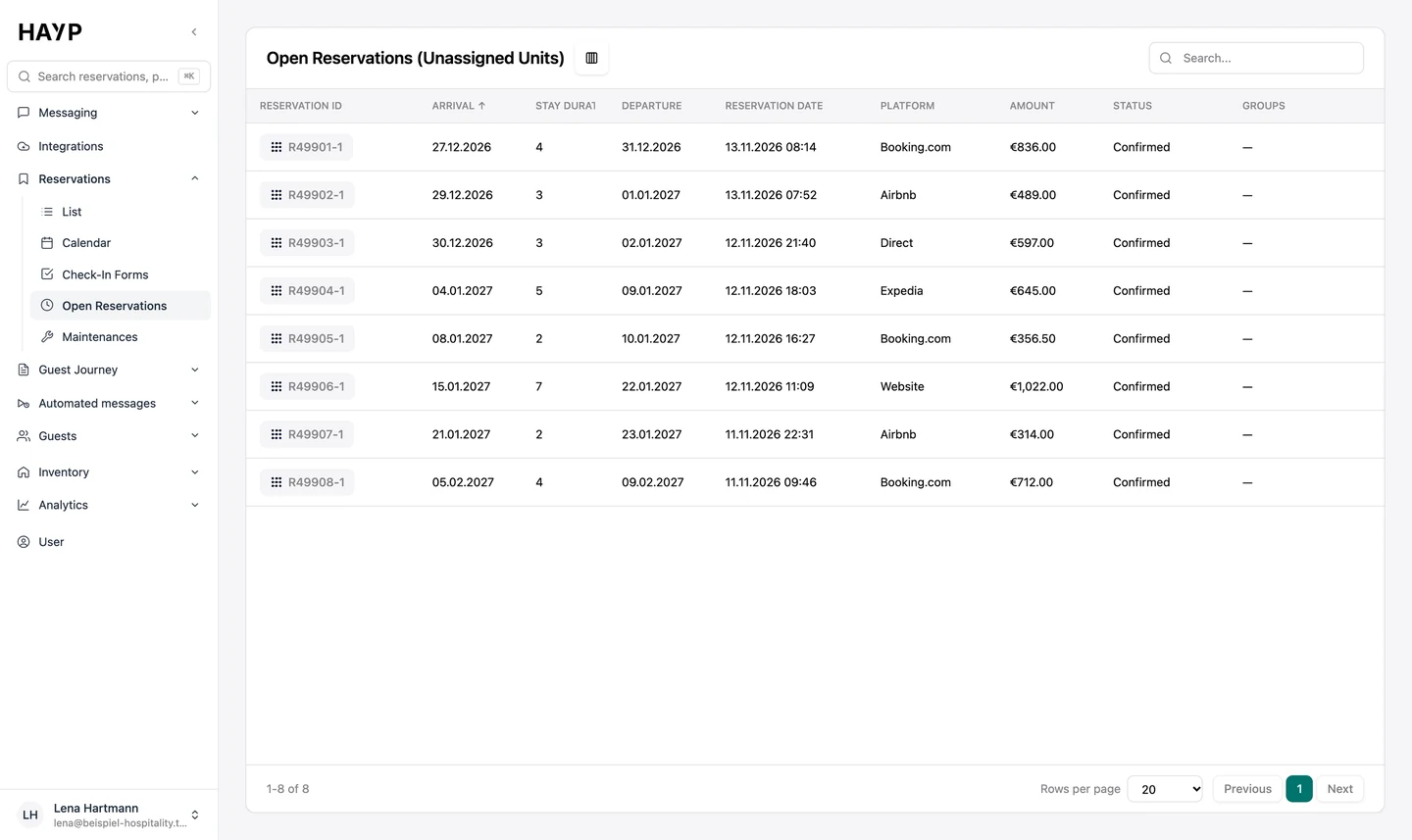
All upcoming reservations without a unit, sorted by arrival, with length of stay, platform, amount and status. Cancellations and no-shows are hidden. Clicking the reservation number opens the reservation in Apaleo.
HAYP's automatic room assignment gives reservations that have no unit yet a suitable free one. It is meant for operators with many units, where someone otherwise distributes reservations by hand in the PMS every morning.
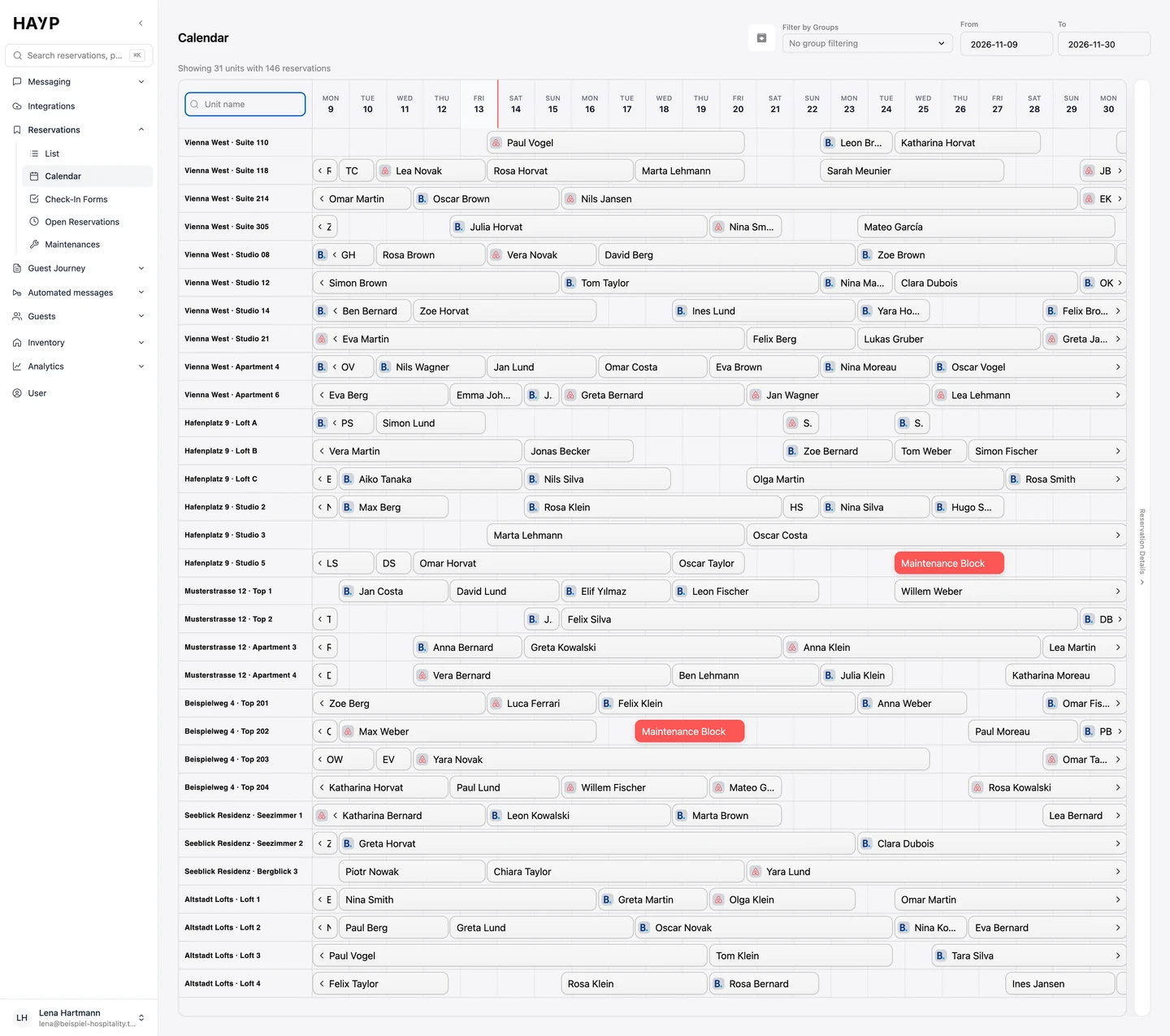
Booking channels sell a category, not a room number. In the PMS, a new reservation therefore often sits on the category only, in Apaleo on the unit group, without a fixed unit. With ten rooms, the front desk sorts that out on the side. With several properties and hundreds of units it becomes a daily job: open the list, find a free unit of the right category, assign it, next reservation.
Three things go wrong along the way:
What planning does differently from a random free unit is shown in the animated comparison with assignment in Apaleo.
Assignment starts with every new reservation in the PMS. HAYP sets it up with you. This is the standard process; we adapt rules and timing to your operation on request.
As soon as a confirmed reservation without a unit arrives in Apaleo, assignment starts for its category.
HAYP takes in every open reservation of the category and releases future stays that overlap with them for planning. Stays in progress, today's arrivals and locked assignments stay where they are.
Planning goes by arrival, longer stays first. Each reservation gets the free unit it fits into most tightly, so as few single nights as possible stay empty. Maintenance and blocked periods count as occupied.
The assignment is saved in Apaleo and retried up to twice if it fails. If a reservation is left without a unit, your team gets an email with the reason. If planning finds a unit for no reservation at all, re-planned stays get their previous unit back.
All upcoming reservations without a unit, sorted by arrival, with length of stay, platform, amount and status. Cancellations and no-shows are hidden. Clicking the reservation number opens the reservation in Apaleo.
Assigned stays sit in the row of their unit. That makes it easy to spot single free nights between two bookings.
With the Guest Experience module, the guest's timeline and the chat show the entry “Room assigned”, and “Room changed” if the unit changes later.
When a reservation gets no unit, the email names the reason: category overbooked, unit under maintenance, assignment locked or property full for the period, plus the stays that block it.
Every operation assigns differently. We settle these points during onboarding.
Room assignment is part of the Portfolio Operations module: €2 per unit per month, net, with no setup costs and no minimum term. A unit is any bookable unit, whether room, apartment or flat. The same module contains the calendar, the reservation overview, listings and reviews. The pricing page shows all modules.
The second routine job that HAYP handles in the background is posting OTA payments.
FAQ
Guests usually book a category. The property picks the actual unit later: by availability, by the guest's wishes and, where possible, so that no single nights are left free. In many operations the front desk does this by hand in the PMS.
With every new reservation without a unit, HAYP re-plans the category: open reservations by arrival, longer stays first, each into the free unit with the smallest remaining gap. The assignment then sits in Apaleo and in the calendar.
It should find every reservation without a unit, check availability, apply your rules and show what is still open. HAYP does this as an automation on top of the PMS, not as another system your team has to maintain.
Apaleo is integrated directly. If you use another PMS, talk to us about your setup.
Yes. Whatever your team assigns in Apaleo, HAYP shows in the calendar and the lists. If the arrival is in the future, a later re-plan may move that stay to another unit of the same category. If an assignment has to stay fixed, lock it in Apaleo.
Yes, when that closes gaps and the arrival is tomorrow or later. Stays in progress, today's arrivals and assignments locked in Apaleo stay where they are. The automation always stays within the booked category.
It is part of the Portfolio Operations module at €2 per unit per month, net. There are no setup costs and no minimum term.
Technically, yes. The script would have to re-plan overlapping stays, recognize maintenance, locked and cross-category assignments, catch API errors and restore the previous state when things go wrong; if it fails, reception often finds out at arrival. In HAYP we set up the automation with you, and exceptions arrive by email with the reason. More on the trade-off under build or buy.
In the demo we show you HAYP with sample data: reservations, calendar, inventory and assignment in one session.