
Aparthotel software for properties whose reception does not cover every arrival
An aparthotel promises hotel service and rents out apartments, often with a front desk that closes in the evening. HAYP is aparthotel software that adds an inbox, automated messages and digital check-in to Apaleo, so guests get answers and check-in information even when reception is not staffed.
Between hotel and apartment: two jobs for aparthotel software
An aparthotel combines two ways of operating. The business traveler staying one night expects a front desk. The guest living in a studio with a kitchen for six weeks wants to be left alone and still get a quick answer. In between is a team that can staff reception for only part of the day.
That leaves two jobs: take routine work off the front desk while it is staffed, and cover the hours after it closes. HAYP does both as an add-on to the PMS. It does not replace Apaleo; it reads properties, units, reservations and guests from it.
A day in an aparthotel, with and without HAYP
Example: a property whose reception is staffed from 7 am to 8 pm.
| Situation | Without HAYP | With HAYP |
|---|---|---|
| 7.00 am, shift starts | The front desk reads the night's messages platform by platform. | ‘Assist’ lists the chats the AI handed over, ‘Open’ everything awaiting a reply. |
| 10.30 am, a guest wants to extend | Find the message, then the reservation, then check occupancy. | Reservation and unit sit next to the chat, the calendar shows occupancy. The booking is made in Apaleo. |
| 3.00 pm, arrivals at the desk | Guest details are taken at the counter. | Pre-check-in was completed before arrival; the data is on the reservation. |
| 9.40 pm, arrival after closing | The guest rings the on-call number. | The arrival message went out automatically; check-in information is in the guest portal. |
| 11.15 pm, a parking question | It waits until morning. | The Autopilot answers from approved replies, or hands over if unsure. |
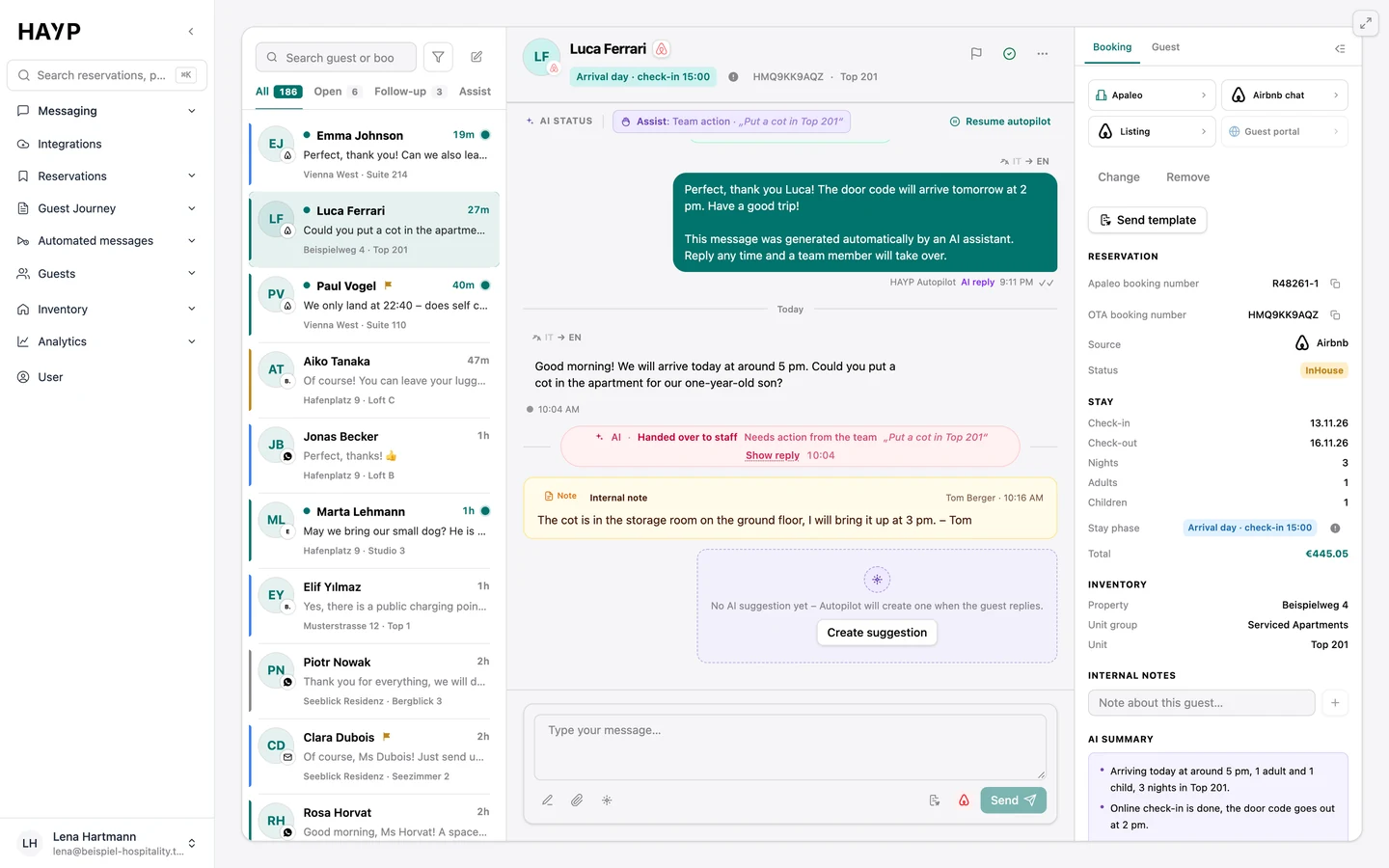
After reception closes, the Autopilot answers as far as you allow
In the AI Autopilot you choose one of three modes per agent. Off: no drafts, nothing is sent. Semi-autonomous: the AI writes the draft and a person sends it. Autonomous: replies go out by themselves after checks. You can start with drafts and switch later.
When the AI hands over is set in the Review tab: on words such as ‘complaint’, on topics such as cancellations, and whenever the guest asks for a person. With the grounding check switched on, a reply not sufficiently backed by stored knowledge is held back. The chat then appears, with the reason, in the Assist tab of AI guest messaging, and the morning shift takes over.
Short stays and long stays get different messages
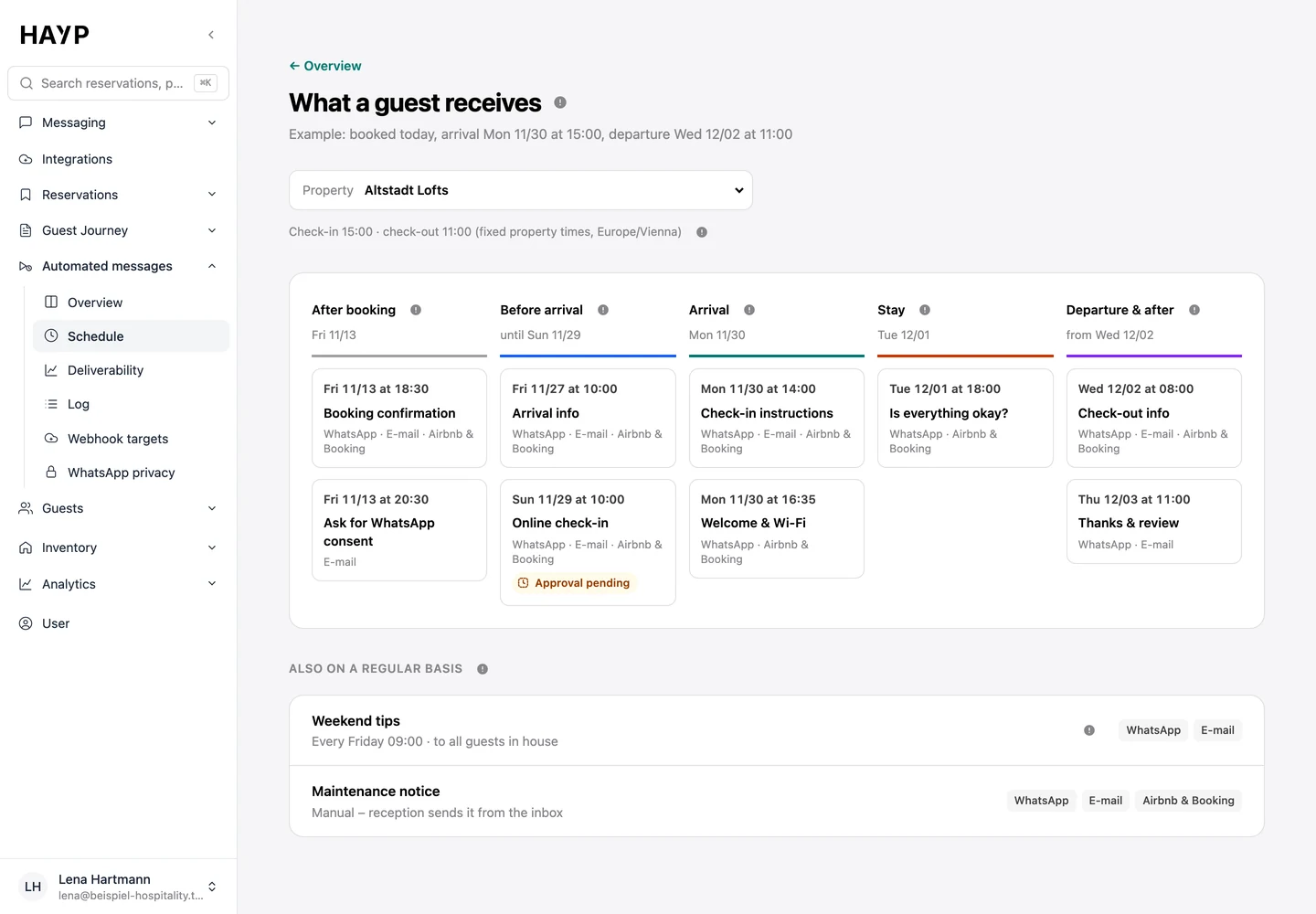
Automated guest messages follow the stay, from booking to after departure. The view What a guest receives shows the schedule per property.
Send rules deal with mixed lengths of stay. A message can go out only for stays of three nights or more, only on a certain day of the stay, or only while pre-check-in is still open. Messages are sent by WhatsApp, email and, with a channel connection, through Airbnb and Booking.com. Only service messages go through the booking platforms.
Digital check-in can be made mandatory: the check-in information then appears only once the guest has entered their details.
What the front desk and the property manager also see
The front desk works in the multi-property calendar: every unit in one list, each reservation with channel and guest name, plus blocks and maintenance. One click opens the details. When a guest returns, the guest CRM shows earlier stays, companions and reviews.
The property manager sees every review in one list in review management and replies with an AI suggestion that can be edited. Portfolio analytics shows occupancy, ADR, RevPAR and average length of stay, also compared across several properties.
Related pages
AI Autopilot
The HAYP Autopilot goes beyond a hotel chatbot: AI agents per property, three modes, guardrails and handover to your team, with a log in every thread.
Learn moreAutomated messages
Automated guest messages from booking until after departure: a schedule per property, channels per message, send rules, delivery status and a full log.
Learn moreDigital check-in
Digital check-in before arrival: guests enter guest and trip details on their phone, and the data is saved to the reservation and the guest profile.
Learn moreServiced apartments
Serviced apartment software on top of Apaleo: one inbox for all guest channels, check-in without a front desk, a calendar for every unit and AI Autopilot.
Learn moreFAQ
Questions about aparthotel management software
What is an aparthotel, and how does it differ from serviced apartments?
In the operating types defined by the German hotel association DEHOGA, an aparthotel is a hotel that accommodates guests in studios or apartments, so a reception is part of it. Serviced apartments are described there as accommodation for longer stays with a limited range of services (definitions, in German). Operations with no front desk have their own page: serviced apartments. The guide aparthotel vs serviced apartment explains the differences in detail.
Who answers guests when reception is closed?
That depends on the mode. In autonomous mode the Autopilot answers what your approved replies and the reservation data cover, and hands everything else to the team, who find it in the Assist tab in the morning. In semi-autonomous mode a finished draft is waiting there.
How does digital check-in work in an aparthotel?
The guest opens a link on their phone and enters guest details, companions and trip details, with travel document details and a signature if you require them. One booker can fill in the form for everyone or send each companion a link. For the German rules on registration forms, see the guide to the hotel guest registration form.
Does an aparthotel have to book every module?
No. Guest Experience, with inbox, Autopilot, check-in and messages, costs €6 per unit per month, Portfolio Operations €2 and Analytics €2, all net. You can start with one module and change the scope for the following month. Setup with our guide is free and there is no minimum term; see pricing for optional setup by HAYP and all details.
Isn't a home-built chatbot enough for the hours after reception closes?
A chatbot answers standard questions. In the evening, though, questions are often about the specific booking: arrival time, access, parking or a complaint. That takes an AI with access to the reservation and unit, clear limits and a handover to the team in the morning, which the Autopilot brings, with a log. The comparison with a home-built tool is under build or buy.
See HAYP for your aparthotel
In a short demo we show the inbox, the schedule and check-in with sample data and work out how your channels and your Apaleo account are connected.